AI on Kubernetes: Default Helm Chart Security and Lateral Movement
Subtitle: Security defaults of 15 AI serving, vector database and MCP Helm charts, tested live. Sorami technical report.
Date: 24 September 2026
Author: Sorami Consulting
Suggested citation: Sorami (2026). AI on Kubernetes: Default Helm Chart Security and Lateral Movement. Sorami Technical Report. https://sorami.com.au/research/ai-kubernetes-helm-chart-security/
What this study shows and does not show
Scope, environment and evaluation bounds: - In-cluster threat model: This study evaluates what an attacker who already controls a single pod in the cluster (a "network neighbour") can reach when official Helm charts are installed with out-of-the-box defaults. It does not model an external internet attacker unless a chart explicitly requests public ingress or load balancer exposure by default. - Static vs dynamic coverage: All 15 charts were rendered and statically analysed. Exactly 8 charts successfully started and were probed dynamically in our evaluation environment; the remaining 7 charts did not start due to hardware architecture constraints, missing CRD prerequisites, or storage class requirements, and are evaluated via static analysis only. - Evaluation environment: Dynamic testing was conducted on a single-node local kind cluster running on an Apple Silicon laptop without GPUs or Pod Security Admission, not an enterprise production EKS or GKE cluster. - Defaults vs configuration: Where charts disable or omit authentication, they assume a trusted internal network. In most cases, native authentication, ingress annotations, or sidecars can be configured straightforwardly by operators before production deployment. - Severity ratings: High, Medium and Low designations reflect Sorami's contextual evaluation under the stated in-cluster threat model, not standard CVSS scores.
Key findings
Plain-language summary for operators, security engineers, and platform teams. "Default" means the official chart installed with no changes.
- Most charts assume a trusted network and omit native API auth by default. 10 of 14 charts with an API disable or omit native authentication by default (KServe is a control plane with no inference endpoint, so it is excluded). All 6 of those that ran in our test environment answered unauthenticated requests, while the 2 tools with authentication enabled refused requests with HTTP 401. In most cases, operators can configure authentication via chart toggles, ingress annotations, or sidecar proxies.
- Many charts do not enforce non-root execution. 10 of 15 charts do not enforce non-root execution in their container specifications. 7 of 15 combine unauthenticated network access with missing non-root enforcement. In live testing across the 4 tools where runtime UID was recorded, 3 ran as UID 0, while Ray ran as UID 1000 but permitted passwordless sudo to root.
- Charts rely on default Kubernetes token mounting, while RBAC varies significantly. All 15 charts leave Kubernetes' default behavior of mounting a ServiceAccount token intact (only 1 pod explicitly disabled automounting). More critically, 4 of 15 charts grant cluster-wide or namespace-wide Secret read access. In particular, the Flux159 MCP server combines unauthenticated HTTP access with cluster-wide Secret read and pod exec rights.
- No default network segmentation is provided by 14 of 15 charts. 14 of 15 charts ship no default NetworkPolicy objects, relying entirely on the cluster architecture and CNI plugins for network segmentation. Exploitability depends on whether the cluster architecture enforces network boundaries.
- Scanners catch generic manifest gaps, not AI-specific attack paths. Four manifest scanners reported 720 Checkov, 1,015 Trivy (168 High or Critical), and 240 kube-linter failures. However, static scanners cannot evaluate runtime API authentication and completely skipped pods declared inside Custom Resources (such as KubeRay's RayCluster).
- Most gaps represent documented defaults; F-13 represents a chart credential bug. Findings F-01 to F-10 represent documented vendor configuration choices for development and evaluation. By contrast, F-13 in LiteLLM is a chart implementation bug: its database migration Job embeds the PostgreSQL database password in plain-text environment variables, making it retrievable by any ServiceAccount with permission to read Jobs or Pods even without Secret access.
Every number above is computed from results.csv and the files in evidence/, and recorded in evidence/totals.json.
Contents
- Abstract
- 1. Introduction: Why test default Helm charts for AI?
- 2. Background and related work
- 3. Threat model and scope
- 4. Methodology: How we tested 15 AI Helm charts
- 5. Experimental setup
- 6. Results: Which charts fail which security checks?
- 7. Findings: Vulnerabilities and insecure defaults
- 8. Per-tool breakdown and hardening values for all 15 charts
- 9. Discussion: Why do AI charts ship insecure defaults?
- 10. Limitations and threats to validity
- 11. Ethics and testing scope
- 12. Recommendations for operators, vendors, and scanner authors
- 13. Frequently asked questions
- 14. Reproducibility: How to verify our results and artefact availability
- 15. Conclusion
- 16. References
- 17. Appendices
Abstract
Teams now run model servers, vector databases, LLM gateways and agent tools on Kubernetes, and most start from the vendor's Helm chart. We examined the lateral movement opportunities available to an attacker who has already gained a single-pod foothold inside the cluster. We rendered 15 official charts for popular AI serving, agent, vector database and Kubernetes MCP tools with default values. We scanned the output with Kubescape, Checkov, kube-linter, Trivy and our own checker, and read vendor docs and source for defaults a manifest cannot show. We then installed each chart on a local kind cluster and sent unauthenticated requests to the 8 that started. 10 of 14 tools with an API assume a trusted network and omit native auth by default, and all 6 of those we ran live answered unauthenticated requests. 10 of 15 charts do not enforce non-root execution, and 7 of 15 combine both. 15 of 15 mount a ServiceAccount token by Kubernetes default, 14 of 15 ship no default NetworkPolicy, and 4 of 15 bind a ClusterRole that can read Secrets. In the worst case, an MCP server listed 23 tools to an unauthenticated caller and returned Secret names from other namespaces. In LiteLLM, a migration Job exposes database credentials in plain-text environment variables. Most gaps reflect documented defaults intended for quick evaluation. Operators should configure authentication, network policies and non-root execution before deploying to shared environments.
1. Introduction: Why test default Helm charts for AI?
1.1 Motivation
Self-hosted AI is now a normal part of a Kubernetes platform. A team that wants a private model endpoint installs a model server (Ollama, vLLM, KServe), a gateway or UI in front of it (Open WebUI, an LLM proxy), a vector database for retrieval (Qdrant, Weaviate, Milvus), and more often an agent tool that can act on the cluster itself (an MCP server for Kubernetes). Each of these ships a Helm chart, and the chart is usually the first thing people install.
The chart's default values decide the first security posture. Many operators never change values they do not understand, and demo clusters tend to become shared clusters. Two public incidents show what happens when AI services run with open defaults on a reachable network. In ShadowRay, Oligo reported thousands of internet-exposed Ray clusters compromised through Ray's unauthenticated Jobs API [11], which the vendor treats as expected behaviour and which NVD records as disputed CVE-2023-48022 [12]. Separate internet scans found over 1,000 exposed Ollama servers each, in 2024 [13] and 2025 [14]. Those studies looked from the internet inward. This report looks at the other common case: an attacker who is already inside the cluster, for example through one compromised pod.
1.2 Research questions
- RQ1. On a default install, which AI tools expose an API that accepts requests with no credentials?
- RQ2. Which defaults allow a container to run as root, or give a pod privileges (ServiceAccount token, cluster-wide RBAC, no NetworkPolicy) that increase the damage from one compromised pod?
- RQ3. Do the static findings from rendered manifests hold when the chart is installed and probed?
- RQ4. How much of this do general-purpose Kubernetes scanners detect?
- RQ5. Are the insecure defaults documented vendor choices or undocumented flaws?
1.3 Contributions
- A matrix of 12 security checks across 15 official charts, pinned to versions pulled on 24 September 2026, with a file and line reference for every cell (section 6.1,
results.csv). - Live confirmation on a local cluster of auth, runtime user and effective RBAC for the 8 charts that started, with full request and response logs (sections 6.3 to 6.5).
- A comparison of four scanners against the same renders, including a case (RayCluster) where all four report nothing useful (section 6.2).
- Thirteen findings with severity, evidence, impact and a values file fix (section 7).
- A checker for AI-specific default checks that reads custom resources such as
RayCluster, which generic scanners skip.
2. Background and related work
Kubernetes defaults. A pod runs as whatever user its image specifies, often root, unless the pod spec sets runAsNonRoot or runAsUser. Each pod mounts a token for its ServiceAccount unless automountServiceAccountToken: false is set [6]. All pods can reach all other pods unless a NetworkPolicy selects them [4]. A chart can change each of these defaults, so the chart's choices matter.
Hardening baselines. The Kubernetes Pod Security Standards define three profiles (Privileged, Baseline, Restricted); Restricted requires non-root containers and disallows privilege escalation [1]. Pod Security Admission enforces these profiles per namespace [2]. The Kubernetes RBAC good practices page warns against granting Secret read and pods/exec broadly [3]. The CIS Kubernetes Benchmark [7] and the NSA and CISA Kubernetes Hardening Guide [8] give the same advice: run as non-root, limit ServiceAccount rights, default-deny network traffic, and pin images. The Kubernetes security checklist summarises these [5]. Our checks (section 4.3) follow these sources.
AI application risks. The OWASP Top 10 for LLM Applications (2025) lists risks such as Excessive Agency (LLM06), Vector and Embedding Weaknesses (LLM08) and Unbounded Consumption (LLM10) [9]. An unauthenticated model or vector endpoint makes several of these easier to reach. The Model Context Protocol specification makes authorization optional for implementations, and warns that Streamable HTTP servers should validate the Origin header and implement authentication [10].
Prior exposure research. ShadowRay [11] and the Ollama scans by Wiz [13] and Cisco [14] measured internet exposure of running servers. They did not examine why the servers were open. We start one step earlier, at the chart default, and measure what an in-cluster caller can reach. We are not aware of a prior study that renders and probes this set of AI charts with the same checks.
Scanners. Kubescape [15], Checkov [16], kube-linter [17] and Trivy [18] check manifests against rules close to the baselines above. They do not know application semantics, such as whether an HTTP API requires a key.
3. Threat model and scope
Attacker position. The threat model assumes the attacker already controls a single pod in the cluster, in any namespace, with no initial Kubernetes credentials beyond that pod's mounted ServiceAccount token. Typical scenarios include a compromised public-facing web app, a malicious dependency executed inside a CI runner, or an untrusted tenant in a shared cluster. From this position, the attacker can send internal network traffic to any Kubernetes Service reachable within the cluster network. We refer to this as the "network neighbour" position.
Crucially, this evaluation models an in-cluster attacker, not an unauthenticated internet adversary. Where a chart requests an external exposure mechanism by default, such as Weaviate's default LoadBalancer Service or the containers/kubernetes-mcp-server Ingress, whether this results in actual internet exploitability depends entirely on cloud provider configuration, VPC routing, and public versus private subnet placement. We did not test live exploitation from the internet.
Assets. Model and vector data; compute (GPU or CPU time); the tool's own admin functions; Kubernetes Secrets; and the ability to run code or change workloads elsewhere in the cluster.
In scope. The chart's default values and rendered manifests; the application's default auth and telemetry behaviour where the chart leaves it unchanged; runtime user and effective RBAC after install; unauthenticated HTTP access from inside the cluster.
Out of scope. Container image CVEs; auth bypass or logic flaws once auth is turned on; supply chain; attacks from the public internet; cloud provider security controls; any third-party or production system.
Definition of "default". helm template or helm install with the chart's own values.yaml and no overrides, except the minimum value three charts need to render at all (section 4.2). A documented default still counts as a finding. The question is what an unchanged install does, not whether the vendor warned about it.
4. Methodology: How we tested 15 AI Helm charts
The study has two passes. The static pass renders each chart and inspects the YAML. It covers all 15 charts and answers questions that a manifest can answer. The dynamic pass installs each chart on a local cluster and sends requests. It covers fewer charts, but it checks whether the static answer holds for a running system. Figure 1 shows the flow.
tools.tsv --> helm template --> evidence/rendered/*.yaml --+--> 4 scanners --> scan-summary.json
  (15 charts,  (defaults)                                  +--> our checker --+
   pinned)                                                  +--> manual-checks.tsv (docs, source)
                                                                              |
kind cluster --> helm install --> curl pod probes, id, can-i --> dynamic-results.tsv
                                                                              v
                                   results.csv --> totals       --> totals.json --> report, figures
Figure 1: Study pipeline. Every number in the report comes from results.csv or a file in evidence/, through evidence/totals.json. The reader can check any cell by following one arrow back.
4.1 Tool selection
Selection rule: popular (GitHub stars of the main project repo on 24 September 2026) and an official Helm chart or manifest from the vendor or project org. We chose "official" because it is the chart a vendor's own docs point to, so its defaults are the vendor's decision. We chose four categories (serving, gateway and UI, vector database, Kubernetes MCP) because a typical self-hosted AI stack combines them. Ollama has no chart of its own, so we used otwld/ollama, the most used community chart. All charts were pulled on 24 September 2026. Source: tools.tsv, results.csv.
Table 1: Tools, chart sources and pinned versions.
| Tool | Chart repo | Chart version | App version | GitHub stars | Pull date |
|---|---|---|---|---|---|
| vLLM production-stack | vllm/vllm-stack (vllm-project.github.io/production-stack) | 0.1.12 | router latest |
92,548 | 2026-09-24 |
| KServe | oci://ghcr.io/kserve/charts/kserve-resources | v0.20.0 | v0.20.0 | 5,992 | 2026-09-24 |
| KubeRay / Ray | kuberay/kuberay-operator + kuberay/ray-cluster | 1.7.1 | Ray 2.52.0 | 43,910 | 2026-09-24 |
| AIBrix | vllm-project/aibrix dist/chart (git tag v0.7.0, c5465890) | 0.7.0 | 0.7.0 (values use nightly) |
5,107 | 2026-09-24 |
| Ollama (otwld) | otwld/ollama (helm.otwld.com) | 1.83.0 | 0.34.2 | 181,534 | 2026-09-24 |
| Open WebUI | open-webui/open-webui (helm.openwebui.com) | 16.6.0 | 0.11.4 | 152,943 | 2026-09-24 |
| LocalAI | go-skynet/local-ai (go-skynet.github.io/helm-charts) | 3.4.2 | image latest |
49,243 | 2026-09-24 |
| LiteLLM | oci://ghcr.io/berriai/litellm-helm (digest sha256:b2c57bc9...1526) | 1.102.1 | 1.102.1 | 59,503 | 2026-09-24 |
| Langfuse | langfuse/langfuse (langfuse.github.io/langfuse-k8s) | 2.1.2 | 4.38.0 | 34,980 | 2026-09-24 |
| n8n | n8n-io/n8n-hosting charts/n8n (git 359e1772) | 1.13.0 | 2.40.5 | 205,806 | 2026-09-24 |
| Qdrant | qdrant/qdrant (qdrant.github.io/qdrant-helm) | 1.19.1 | v1.19.1 | 34,771 | 2026-09-24 |
| Weaviate | weaviate/weaviate (weaviate.github.io/weaviate-helm) | 17.8.3 | 1.38.2 | 16,841 | 2026-09-24 |
| Milvus | milvus/milvus (zilliztech.github.io/milvus-helm) | 5.0.28 | 3.0.1 | 46,242 | 2026-09-24 |
| containers/kubernetes-mcp-server | oci://ghcr.io/containers/charts/kubernetes-mcp-server | 0.1.0 | 0.0.67 (image latest) |
2,116 | 2026-09-24 |
| Flux159 mcp-server-kubernetes | Flux159/mcp-server-kubernetes helm-chart (git tag v4.1.7, 26a165cf) | 2.8.0 | 2.8.0 (image latest) |
1,594 | 2026-09-24 |
Considered and excluded: Flowise and Chroma (no official chart), NVIDIA NIM Operator (needs an NGC key and GPU), llm-d (multi-chart guides, no single default install), Text Generation Inference and SGLang (no official chart found).
4.2 Default values and render overrides
We used the chart's own values.yaml with no overrides, into namespace sbd (static) or a namespace per tool (live). Three charts refuse to render without one value. We set the minimum value needed and nothing else, so the result still reflects the vendor's defaults.
Table 2: The only overrides used, and why.
| Chart | Override | Why |
|---|---|---|
| n8n | secretRefs.env.N8N_ENCRYPTION_KEY=research-placeholder-not-a-secret |
Chart refuses the placeholder key (evidence/rendered/n8n.err). This is a secure default. |
| containers/kubernetes-mcp-server | ingress.host=mcp.example.invalid |
Ingress is on by default and needs a host (evidence/rendered/k8s-mcp-server.err). |
| Langfuse | clickhouse.crdCheck=false |
Offline render only, as the chart error message suggests. |
A check is marked as an insecure default when the rendered manifest (or, for auth and telemetry, the application default the chart leaves in place) is the insecure choice. Documented choices still count: the question is what an unchanged install does.
4.3 Check definitions
Each check asks one yes or no question about the default. Table 3 gives the plain meaning, the exact rule, and why it matters to the attacker in section 3. The rules are implemented in our internal checker (static) and totals script (matrix), both covered by unit tests.
Table 3: The 12 checks. "X" in the matrix means the rule matched.
| Check | Plain meaning | Exact rule (X when) | Why it matters |
|---|---|---|---|
| Auth | API auth omitted or disabled | Model, vector or MCP endpoint accepts requests with no key, token or session by default (docs and source, manual-checks.tsv; confirmed live where possible). n/a if the chart has no such endpoint. |
In-cluster callers can invoke or modify the tool without credentials. |
| Root | Chart does not enforce non-root | At least one long-running container has neither runAsNonRoot: true nor a non-zero runAsUser, at pod or container level. Init containers are not counted. |
Container execution user defaults to image specification, increasing blast radius if paired with code execution. |
| Priv | Privileged container | Any container with privileged: true in the render. |
Privileged containers have near host-level access. |
| hostPath | Host filesystem mount | Any pod volume of type hostPath. |
Direct access to node files. |
| SA token | Automounts token (K8s default) | At least one pod mounts a ServiceAccount token by default (pod or ServiceAccount does not set automountServiceAccountToken: false). Default Kubernetes behavior. |
An attacker compromising the pod inherits the ServiceAccount's API identity. |
| Secrets | Cluster-wide Secret read | A ClusterRole in the render grants get, list or watch on secrets. |
The chart's ServiceAccount can read credentials in every namespace. |
| NetPol | No default network policy | No NetworkPolicy object in the render. Default Kubernetes behavior. | Exploitability depends on cluster architecture; pods can reach the tool unless CNI default-deny is applied. |
| Limits | Missing resource limits | At least one long-running container has neither a CPU nor a memory limit. | In-cluster caller can exhaust node resources (OWASP LLM10 [9]). |
| Tag | Floating image tag | Any image with no tag or with latest, main, nightly, stable, master or dev. |
The running code can change with no chart change, and cannot be audited. |
| Telem | Telemetry on | The application sends usage data to the vendor by default and the chart does not turn it off (docs and source). | Data leaves the cluster without an explicit choice. |
| Creds | Known placeholder credential | A Secret, ConfigMap or env value in the render equals a well-known placeholder (for example minioadmin), or an env URL contains a literal password. Random per-install values do not count. |
Anyone who has read the chart knows the password. |
| Expose | Requests external routing | A LoadBalancer or NodePort Service, or an Ingress, HTTPRoute or Route, is on by default. | External reach depends on cloud networking and public subnet configuration; not tested from internet. |
4.4 Static pass
- Render each chart with
helm template(section 5.2). - Run four scanners on each render: Kubescape, Checkov, kube-linter and Trivy in config mode. We used four because each has different rule sets and none covers everything. Counts go to
evidence/scans/scan-summary.jsonandscan-detail.json. - Run our checker on each render for the checks in Table 3. It also reads pod templates inside
RayClustercustom resources, which the scanners skip. - Check auth and telemetry by hand against vendor docs and source, because a manifest often does not show them. Results and citations are in
manual-checks.tsv. - Merge into
results.csv, one row per tool, with an evidence column for every check.
4.5 Dynamic pass
We installed each chart on a local kind cluster, one or two at a time, with the same values as the static pass. A curl pod in its own namespace sent HTTP requests with no credentials to the tool's Services. For each tool that started we recorded: the HTTP status and body for each request, the container user (id), and for charts with RBAC the effective permissions (kubectl auth can-i --list). A tool that was not ready within 10 minutes was skipped and the reason recorded. Writes were limited to creating and deleting one empty object per tool. For five tools every request and response was logged in full (section 5.2).
4.6 Severity scheme
We rate each finding High, Medium or Low using the rubric in section 7.1. We did not use CVSS [19], because CVSS evaluates standardized software vulnerabilities rather than configuration defaults that vendors deliberately document for quick onboarding. Our rubric is a contextual evaluation under the stated in-cluster threat model, assessing what actions an uncredentialed network neighbour can perform, whether code execution or privilege escalation occurs, and whether the finding was confirmed live.
5. Experimental setup
5.1 Environment
Recorded in evidence/environment.txt. Dynamic testing was conducted on a single-node local kind cluster running on an Apple Silicon laptop with no GPU and no external ingress controllers, rather than a multi-node production cloud environment (EKS, GKE, or AKS). The trade-offs and differences from enterprise production environments are detailed in section 9.
Table 4: Test environment.
| Item | Value |
|---|---|
| Host | Apple M1 Pro laptop, arm64, macOS 14.2.1 |
| Docker | Docker Desktop 24.0.7 (client and server), VM 8,227,573,760 bytes RAM, 10 CPUs |
| kind [20] | v0.33.0, one node, image kindest/node@sha256:a1ed56cf...580ae5 |
| Kubernetes | v1.37.0 (from /kind/version in the node image) |
| GPU | none (CPU only) |
| Helm (render) | v3.19.0 (Helm 3.15 cannot render Langfuse: fromToml missing) |
| Scanners | Kubescape 4.0.14, Checkov 3.3.19, kube-linter 0.8.3, Trivy 0.74.0 (config mode) |
The kind cluster used its own kubeconfig file (/tmp/sbd/kind.kubeconfig). Every call passed --context kind-sbd. No other kube context was read or changed. The static pass used an empty kubeconfig.
5.2 Commands
Static render:
helm template rel <chart-dir> --namespace sbd [override] > rendered/<name>.yaml
kube-linter lint rendered/<name>.yaml --format json > scans/<name>.kubelinter.json
trivy config --quiet --format json rendered/<name>.yaml > scans/<name>.trivy.json
checkov -f rendered/<name>.yaml --framework kubernetes -o json --quiet --compact > scans/<name>.checkov.json
kubescape scan rendered/<name>.yaml --format json --output scans/<name>.kubescape.json
Live pass (one or two charts at a time, on a kind cluster deleted afterwards):
kind create cluster --name sbd --kubeconfig /tmp/sbd/kind.kubeconfig
kubectl --context kind-sbd -n probe run curl --image=curlimages/curl:8.10.1 --restart=Never --command -- sleep 36000
helm --kube-context kind-sbd install rel <chart> -n <ns> [override] --wait --timeout 10m
kubectl --context kind-sbd -n probe exec curl -- curl -s -m 5 -w ' HTTP %{http_code}' http://<svc>.<ns>.svc:<port><path>
kubectl --context kind-sbd -n <ns> exec <pod> -- id
kubectl --context kind-sbd auth can-i --list --as=system:serviceaccount:<ns>:<sa>
kind delete cluster --name sbd
For Ray, Ollama, Qdrant, Weaviate and Open WebUI, curl -sS -i -w logged every request and response in full.
Probe rules: requests only to Services we installed, no credentials sent, writes limited to creating and deleting one empty collection (Qdrant) or class (Weaviate) and one echo job (Ray). Tools not ready within 10 minutes were skipped and the reason recorded.
6. Results: Which charts fail which security checks?
This section gives the data. Section 7 turns it into findings. Section 8 provides a per-tool breakdown with hardening values. Section 9 discusses what it means.
6.1 Results matrix
Table 5 answers RQ1 and RQ2 for all 15 charts. Read it by row to see one tool's defaults, or by column to see how common one weakness is. X = insecure default present. ok = not present. n/a = check does not apply. Source: evidence/totals.json (matrix), built from results.csv. Privileged and hostPath are read from evidence/rendered/*.yaml.
Check definitions are in Table 3 (section 4.3).
Table 5: Insecure defaults per tool and check (80 X cells in 179 applicable cells).
| Tool | Auth | Root | Priv | hostPath | SA token | Secrets | NetPol | Limits | Tag | Telem | Creds | Expose | X count |
|---|---|---|---|---|---|---|---|---|---|---|---|---|---|
| vLLM production-stack | X | X | ok | ok | X | ok | X | ok | X | ok | ok | ok | 5 |
| KServe | n/a | ok | ok | ok | X | X | X | ok | ok | ok | ok | ok | 3 |
| KubeRay / Ray | X | X | ok | ok | X | X | X | ok | ok | X | ok | ok | 6 |
| AIBrix | X | X | ok | ok | X | X | X | X | X | ok | ok | X | 8 |
| Ollama (otwld) | X | X | ok | ok | X | ok | X | X | ok | ok | ok | ok | 5 |
| Open WebUI | ok | X | ok | ok | X | ok | X | X | X | ok | ok | ok | 5 |
| LocalAI | X | X | ok | ok | X | ok | X | X | X | ok | ok | ok | 6 |
| LiteLLM | ok | X | ok | ok | X | ok | ok | X | ok | ok | X | ok | 4 |
| Langfuse | ok | X | ok | ok | X | ok | X | X | ok | X | ok | ok | 5 |
| n8n | ok | ok | ok | ok | X | ok | X | ok | ok | X | ok | ok | 3 |
| Qdrant | X | ok | ok | ok | X | ok | X | X | ok | X | ok | ok | 5 |
| Weaviate | X | X | X | ok | X | ok | X | X | X | X | ok | X | 9 |
| Milvus | X | X | ok | ok | X | ok | X | X | ok | ok | X | ok | 6 |
| containers/kubernetes-mcp-server | X | ok | ok | ok | X | ok | X | ok | X | ok | ok | X | 5 |
| Flux159 mcp-server-kubernetes | X | ok | ok | ok | X | X | X | ok | X | ok | ok | ok | 5 |
| Total X | 10 of 14 | 10 of 15 | 1 of 15 | 0 of 15 | 15 of 15 | 4 of 15 | 14 of 15 | 9 of 15 | 7 of 15 | 5 of 15 | 2 of 15 | 3 of 15 | 80 |
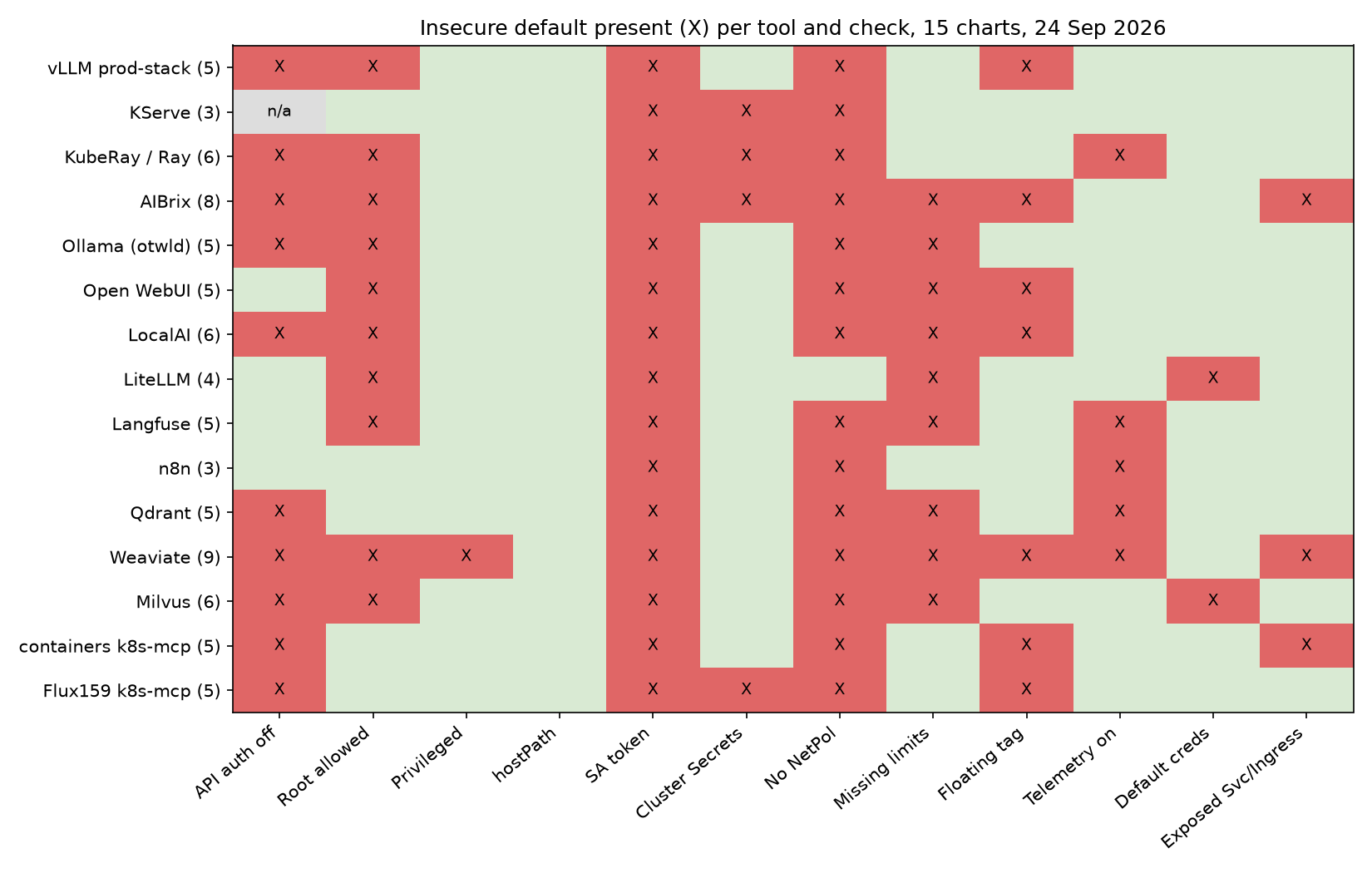
Figure 2: Table 5 as a heatmap. Red cells are insecure defaults. The SA token and NetPol columns are almost fully red: nearly every chart leaves pod token mounting and network reach at default Kubernetes settings. The Auth and Root columns are the next most common, and they overlap in 7 tools where unauthenticated network access coincides with missing non-root enforcement.
Notes on the matrix:
- Auth omitted and root execution not enforced together: 7 of 15 (vLLM production-stack, KubeRay, AIBrix, Ollama, LocalAI, Weaviate, Milvus). Combining an open in-cluster network endpoint with a container running as root significantly widens the blast radius of any code execution or SSRF bug.
- The one NetworkPolicy in the set (LiteLLM) covers only its bundled Postgres.
- Tools with auth on still have first-visit risk: in Open WebUI the first account to sign up becomes admin (sign-up is open until then and closes after it, confirmed live and in source), Langfuse leaves sign-up open, and n8n asks for owner setup on first visit.
- Exposure: Weaviate creates two LoadBalancer Services (HTTP 80, gRPC 50051). containers/kubernetes-mcp-server creates an Ingress. AIBrix creates two HTTPRoutes. Note that exploitability from the public internet depends entirely on cloud provider routing and public subnet placement.
6.2 Scanner results
This section answers RQ4. It shows what an operator would see if they ran a standard scanner on the default render, before installing. Failed checks on the default render. Source: evidence/scans/scan-detail.json (built from the raw scanner JSON) and evidence/scans/scan-summary.json. Severity split is shown as Critical/High/Medium/Low. Checkov and kube-linter do not rate severity in this setup (Checkov severities need a Prisma Cloud key; kube-linter has no severity field), so only counts are shown. "Top 3" is ordered by number of failing resources.
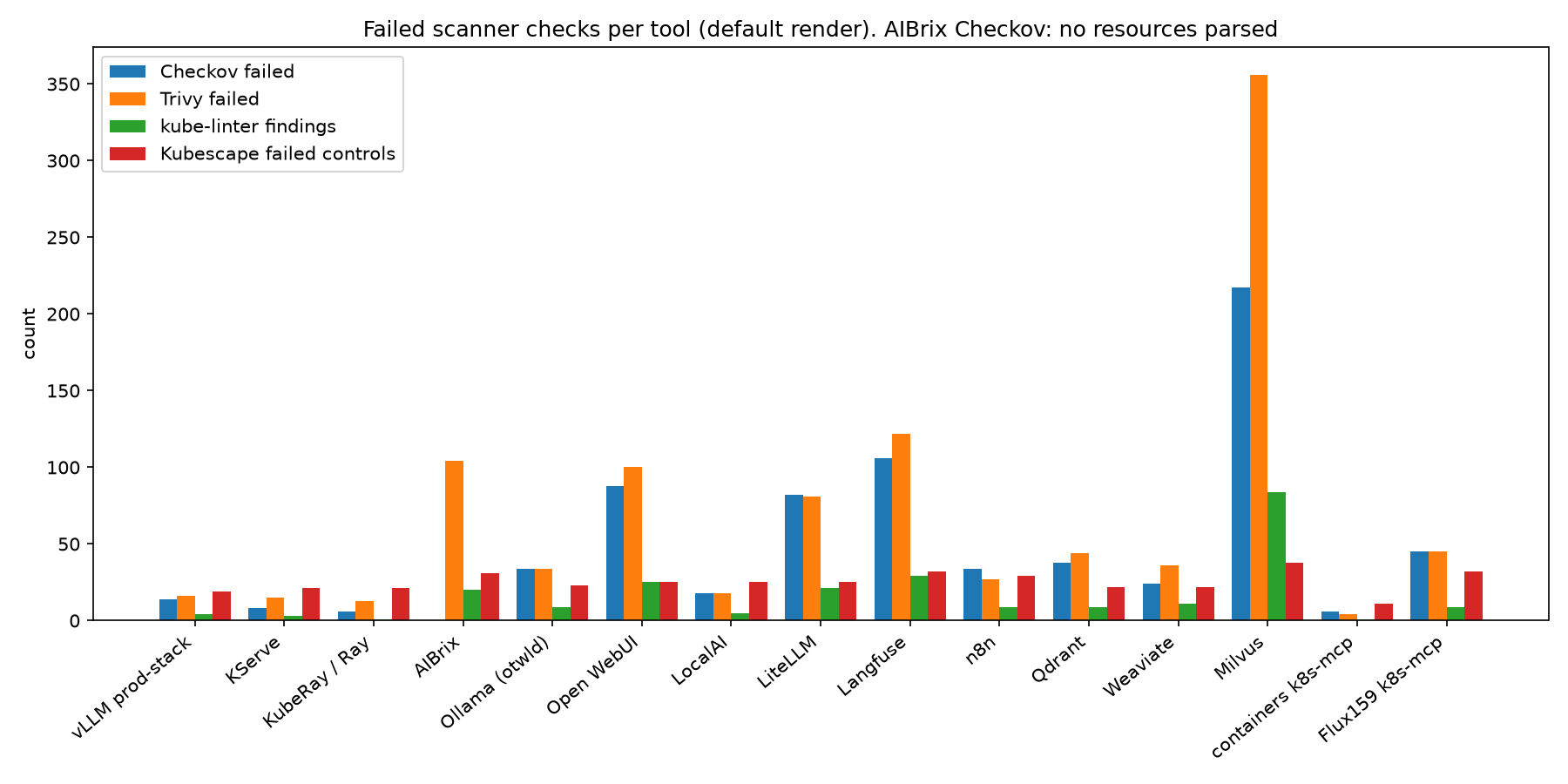
Figure 3: Failed scanner checks per tool on the default render. Milvus dominates because it deploys 14 workloads; counts grow with the number of resources, not only with risk. The Ray cluster bar is empty although Table 5 shows root allowed, which is the main scanner blind spot in this study.
Kubescape and Trivy (with severity)
Table 6: Kubescape and Trivy results per tool.
| Tool | Kubescape score | Kubescape failed controls (C/H/M/L) | Kubescape top 3 | Trivy failed (C/H/M/L) | Trivy top 3 |
|---|---|---|---|---|---|
| vLLM production-stack | 79.3 | 19 (0/6/10/3) | C-0009, C-0013, C-0016 | 16 (0/3/6/7) | KSV-0118, KSV-0001, KSV-0003 |
| KServe | 80.4 | 21 (0/6/13/2) | C-0053, C-0012, C-0037 | 15 (2/3/6/4) | KSV-0056, KSV-0020, KSV-0021 |
| KubeRay operator | 79.2 | 21 (0/6/11/4) | C-0053, C-0004, C-0007 | 13 (1/4/4/4) | KSV-0056, KSV-0048, KSV-0015 |
| AIBrix | 79.4 | 31 (0/11/16/4) | C-0013, C-0017, C-0030 | 104 (2/20/28/54) | KSV-0118, KSV-0014, KSV-0020 |
| Ollama (otwld) | 76.4 | 23 (0/7/9/7) | C-0004, C-0009, C-0013 | 34 (0/6/8/20) | KSV-0118, KSV-0001, KSV-0003 |
| Open WebUI | 76.6 | 25 (0/7/10/8) | C-0004, C-0009, C-0013 | 100 (0/17/23/60) | KSV-0118, KSV-0001, KSV-0003 |
| LocalAI | 73.7 | 25 (0/7/11/7) | C-0004, C-0009, C-0013 | 18 (0/3/5/10) | KSV-0118, KSV-0001, KSV-0003 |
| LiteLLM | 77.3 | 25 (0/7/11/7) | C-0004, C-0009, C-0013 | 81 (0/13/18/50) | KSV-0118, KSV-0011, KSV-0014 |
| Langfuse | 75.7 | 32 (0/10/14/8) | C-0030, C-0076, C-0211 | 122 (0/17/29/76) | KSV-0118, KSV-0020, KSV-0021 |
| n8n | 78.4 | 29 (0/9/13/7) | C-0017, C-0030, C-0034 | 27 (0/5/7/15) | KSV-0014, KSV-0020, KSV-0021 |
| Qdrant | 80.4 | 22 (0/6/10/6) | C-0013, C-0017, C-0030 | 44 (0/5/11/28) | KSV-0003, KSV-0004, KSV-0020 |
| Weaviate | 76.6 | 22 (0/8/10/4) | C-0004, C-0009, C-0013 | 36 (0/5/9/22) | KSV-0001, KSV-0003, KSV-0004 |
| Milvus | 73.8 | 38 (0/11/18/9) | C-0004, C-0009, C-0017 | 356 (0/55/97/204) | KSV-0118, KSV-0003, KSV-0004 |
| containers/kubernetes-mcp-server | 85.4 | 11 (0/3/6/2) | C-0013, C-0030, C-0034 | 4 (0/0/2/2) | KSV-0013, KSV-0020, KSV-0021 |
| Flux159 mcp-server-kubernetes | 72.1 | 32 (0/8/16/8) | C-0013, C-0018, C-0030 | 45 (1/6/15/23) | KSV-0013, KSV-0020, KSV-0021 |
| Total | 1,015 (6/162/268/579) |
Trivy High plus Critical across all charts: 168.
Checkov and kube-linter (counts only)
Table 7: Checkov and kube-linter results per tool.
| Tool | Checkov failed | Checkov top 3 | kube-linter findings | kube-linter top 3 |
|---|---|---|---|---|
| vLLM production-stack | 14 | CKV2_K8S_6, CKV_K8S_11, CKV_K8S_14 | 4 | dangling-service, latest-tag, no-read-only-root-fs |
| KServe | 8 | CKV2_K8S_6, CKV_K8S_15, CKV_K8S_155 | 3 | env-var-secret, liveness-port, readiness-port |
| KubeRay operator | 6 | CKV2_K8S_6, CKV_K8S_15, CKV_K8S_29 | 1 | unset-cpu-requirements |
| AIBrix | not parsed (0 resources) | n/a | 20 | no-read-only-root-fs, run-as-non-root, unset-memory-requirements |
| Ollama (otwld) | 34 | CKV2_K8S_6, CKV_K8S_10, CKV_K8S_11 | 9 | no-read-only-root-fs, run-as-non-root, unset-cpu-requirements |
| Open WebUI | 88 | CKV2_K8S_6, CKV_K8S_10, CKV_K8S_11 | 25 | no-read-only-root-fs, run-as-non-root, unset-cpu-requirements |
| LocalAI | 18 | CKV2_K8S_6, CKV_K8S_11, CKV_K8S_13 | 5 | latest-tag, no-read-only-root-fs, run-as-non-root |
| LiteLLM | 82 | CKV_K8S_21, CKV_K8S_11, CKV_K8S_13 | 21 | no-read-only-root-fs, unset-cpu-requirements, unset-memory-requirements |
| Langfuse | 106 | CKV_K8S_21, CKV2_K8S_6, CKV_K8S_40 | 29 | unset-cpu-requirements, unset-memory-requirements, no-read-only-root-fs |
| n8n | 34 | CKV2_K8S_6, CKV_K8S_15, CKV_K8S_22 | 9 | no-read-only-root-fs, no-anti-affinity, pdb-min-available |
| Qdrant | 38 | CKV_K8S_21, CKV2_K8S_6, CKV_K8S_20 | 9 | no-read-only-root-fs, run-as-non-root, unset-cpu-requirements |
| Weaviate | 24 | CKV_K8S_21, CKV2_K8S_6, CKV_K8S_10 | 11 | no-read-only-root-fs, run-as-non-root, unset-cpu-requirements |
| Milvus | 217 | CKV_K8S_11, CKV_K8S_13, CKV_K8S_15 | 84 | no-read-only-root-fs, unset-memory-requirements, run-as-non-root |
| containers/kubernetes-mcp-server | 6 | CKV2_K8S_6, CKV_K8S_14, CKV_K8S_15 | 1 | latest-tag |
| Flux159 mcp-server-kubernetes | 45 | CKV_K8S_21, CKV2_K8S_6, CKV_K8S_14 | 9 | latest-tag, unset-cpu-requirements, unset-memory-requirements |
| Total | 720 | 240 |
Scanner caveats:
- The Ray cluster chart renders a
RayClustercustom resource only. Kubescape found no resources to scan, Checkov parsed 0 resources and Trivy passed 61 checks with 0 failures (evidence/scans/run.log, raw JSON). The scanners do not read RayCluster pod templates. Our checker does, which is why the matrix shows root allowed for Ray while the scanners show nothing. - Checkov parsed 0 resources from the AIBrix render, so AIBrix has no Checkov count.
- Counts scale with the number of resources a chart creates. Milvus deploys 14 workloads by default, so its totals are not comparable one to one with single-pod charts.
- Control IDs used above: C-0004 memory limits, C-0009 resource limits, C-0013 non-root containers, C-0017 immutable filesystem, C-0030 ingress and egress blocked, C-0053 access container service account; KSV-0118 default security context, KSV-0001 privilege escalation, KSV-0003 capabilities not dropped, KSV-0020/0021 UID/GID at or below 10000; CKV2_K8S_6 no NetworkPolicy, CKV_K8S_11 CPU limits, CKV_K8S_21 default namespace.
What the scanners do and do not tell you. They flag the generic hardening gaps in Table 5 (root, limits, NetworkPolicy, tags) consistently, and with many duplicate hits per resource. None of them can say whether an API requires a login (the Auth column), whether telemetry is on, or what a ClusterRole means once bound. Those are the checks that produced the High findings in section 7. A clean scanner run is therefore not evidence that an AI chart is safe to install as is.
6.3 Live probe results
This section answers RQ3: does the static answer hold on a running install? 8 of 15 charts started on defaults and were probed from a curl pod in namespace probe. 7 did not start (section 6.6). All requests carried no credentials. Response bodies are trimmed. Source files are named under each tool.
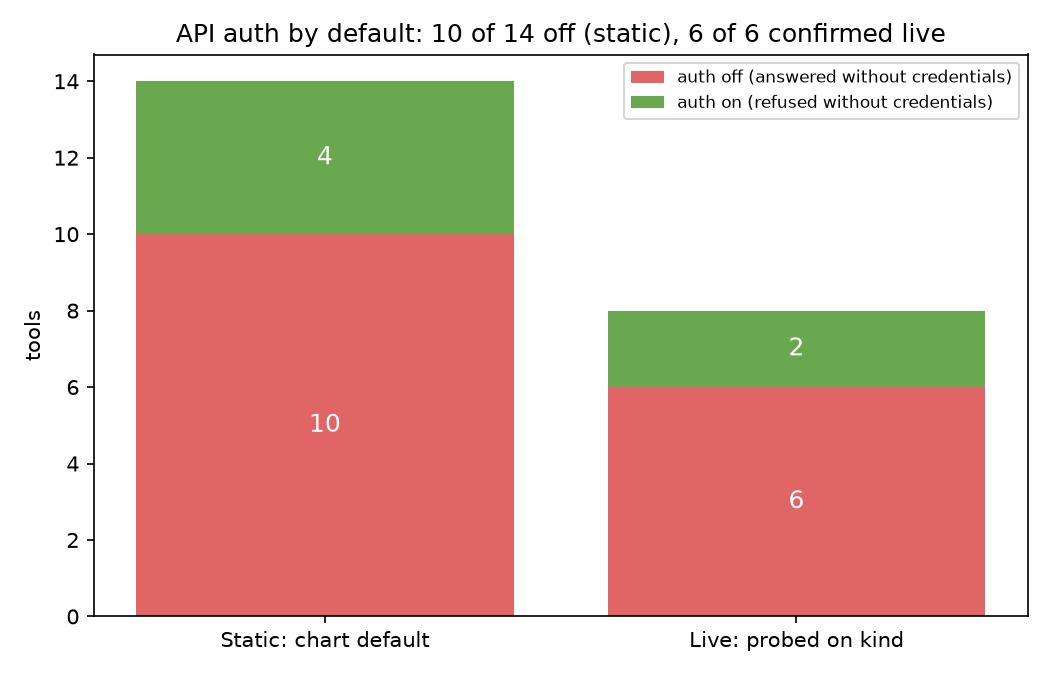
Figure 4: API auth by default. Left: the static result for the 14 tools with an API (10 off, 4 on). Right: the 8 tools we could run (6 off, 2 on). Every live result matched the static one, so the static Auth column is a reliable guide for the 6 API tools we could not start.
Summary
Table 8: Live result per probed tool.
| Tool | Static auth | Live result | Runtime user (id) |
Evidence |
|---|---|---|---|---|
| KubeRay / Ray | off | open: dashboard 200, job submit ran a command | uid=1000(ray), in group sudo; sudo -n id gives uid=0 |
evidence/dynamic/ray-probe-full.txt, ray-probe.txt |
| Ollama (otwld) | off | open: 200 on /api/version, /api/tags, /api/ps | uid=0(root) | evidence/dynamic/ollama-probe-full.txt, ollama-probe.txt |
| Qdrant | off | open: 200 on reads, create and delete worked | uid=1000 gid=2000 | evidence/dynamic/qdrant-probe-full.txt, vector-probe.txt |
| Weaviate | off | open: 200 on reads, create and delete worked, also on NodePort | uid=0(root) | evidence/dynamic/weaviate-probe-full.txt, vector-probe.txt |
| containers/kubernetes-mcp-server | off | open: MCP initialize and tools/list (20 tools); tool calls Forbidden by RBAC | not recorded | evidence/dynamic/kmcp-probe.txt |
| Flux159 mcp-server-kubernetes | off | open: 23 tools; listed Secrets in other namespaces | not recorded | evidence/dynamic/flux159-probe.txt |
| Open WebUI | on | refused: 401 on 4 API paths; /api/config 200 with enable_signup: true, onboarding: true |
uid=0(root) | evidence/dynamic/owui-probe-full.txt, owui-probe.txt |
| LiteLLM | on | refused: 401 on 7 API paths; /ui/ and /openapi.json 200 | not recorded | evidence/dynamic/litellm-probe.txt |
Totals (evidence/totals.json, dynamic): auth off confirmed live 6 of 6, auth on confirmed live 2 of 2, ran as uid 0 3 of 4 static "root allowed" tools with a recorded user. No live result contradicted the static result.
6.4 Requests and responses
The blocks below are the evidence behind Table 8. Each shows what a pod with no credentials asked for and what it got. For Ray, Ollama, Qdrant, Weaviate and Open WebUI, the *-probe-full.txt files hold the UTC timestamp, the full curl command, method, URL, request body, HTTP status, response headers and response body. Bodies over 2 KB are trimmed, and the file says so. The blocks below show method, path, request body and status from those files.
KubeRay / Ray (dashboard port 8265, head Service rc-kuberay-head-svc). evidence/dynamic/ray-probe-full.txt
GET  http://rc-kuberay-head-svc.kuberay.svc:8265/api/version           200 {"version": "4", "ray_version": "2.52.0", ...}
GET  http://rc-kuberay-head-svc.kuberay.svc:8265/nodes?view=summary    200 {"result": true, "msg": "Node summary fetched.", ...} (17 KB, trimmed)
GET  http://rc-kuberay-head-svc.kuberay.svc:8265/api/jobs/             200 []
POST http://rc-kuberay-head-svc.kuberay.svc:8265/api/jobs/
     body {"entrypoint":"echo sbd-probe-$(id -u)","submission_id":"sbd-probe-2"}
                                                                        200 {"job_id": "sbd-probe-2", "submission_id": "sbd-probe-2"}
GET  http://rc-kuberay-head-svc.kuberay.svc:8265/api/jobs/sbd-probe-2  200 {... "status": "SUCCEEDED", "message": "Job finished successfully." ...}
GET  http://rc-kuberay-head-svc.kuberay.svc:8265/api/jobs/sbd-probe-2/logs
                                                                        200 {"logs": "...Running entrypoint for job sbd-probe-2: echo sbd-probe-$(id -u)\nsbd-probe-1000\n"}
id (head):   uid=1000(ray) gid=100(users) groups=100(users),27(sudo)
sudo -n id:  uid=0(root) gid=0(root) groups=0(root)
head SA: default (token mounted: ca.crt namespace token); default SA get secrets: no
Ollama (port 11434, Service rel-ollama). evidence/dynamic/ollama-probe-full.txt
GET    http://rel-ollama.ollama.svc:11434/              200 Ollama is running
GET    http://rel-ollama.ollama.svc:11434/api/version   200 {"version":"0.34.2"}
GET    http://rel-ollama.ollama.svc:11434/api/tags      200 {"models":[]}
GET    http://rel-ollama.ollama.svc:11434/api/ps        200 {"models":[]}
POST   http://rel-ollama.ollama.svc:11434/api/show      body {"model":"sbd-probe-nonexistent"}
                                                        404 {"error":"model 'sbd-probe-nonexistent:latest' not found"}
DELETE http://rel-ollama.ollama.svc:11434/api/delete    body {"model":"sbd-probe-nonexistent"}
                                                        404 {"error":"model 'sbd-probe-nonexistent' not found"}
id: uid=0(root) gid=0(root) groups=0(root)
The 404s show the model management endpoints answer without auth. No model was loaded, so nothing was deleted.
Qdrant (port 6333, Service rel-qdrant). evidence/dynamic/qdrant-probe-full.txt
GET    http://rel-qdrant.qdrant.svc:6333/                        200 {"title":"qdrant - vector search engine","version":"1.19.1",...}
GET    http://rel-qdrant.qdrant.svc:6333/collections             200 {"result":{"collections":[]},"status":"ok"}
PUT    http://rel-qdrant.qdrant.svc:6333/collections/sbd_probe
       body {"vectors":{"size":4,"distance":"Cosine"}}           200 {"result":true,"status":"ok"}
GET    http://rel-qdrant.qdrant.svc:6333/collections             200 {"result":{"collections":[{"name":"sbd_probe"}]},"status":"ok"}
GET    http://rel-qdrant.qdrant.svc:6333/collections/sbd_probe   200 {"result":{"status":"green",...,"points_count":0,...}}
DELETE http://rel-qdrant.qdrant.svc:6333/collections/sbd_probe   200 {"result":true,"status":"ok"}
GET    http://rel-qdrant.qdrant.svc:6333/collections             200 {"result":{"collections":[]},"status":"ok"}
id: uid=1000 gid=2000 groups=2000,3000
Same Service, no auth: /telemetry, /cluster and /dashboard also returned 200 (vector-probe.txt).
Weaviate (Service weaviate, port 80). evidence/dynamic/weaviate-probe-full.txt
GET    http://weaviate.weaviate.svc/v1/meta                200 {"grpcMaxMessageSize":104858000,"hostname":"http://[::]:8080",...} (5.7 KB, trimmed)
GET    http://weaviate.weaviate.svc/v1/schema              200 {"classes":[]}
GET    http://weaviate.weaviate.svc/v1/nodes               200 {"nodes":[{"name":"weaviate-0","status":"HEALTHY","version":"1.38.2",...}]}
POST   http://weaviate.weaviate.svc/v1/schema
       body {"class":"SbdProbe","vectorizer":"none","properties":[]}
                                                           200 {"class":"SbdProbe","invertedIndexConfig":{...
GET    http://weaviate.weaviate.svc/v1/schema              200 {"classes":[{"class":"SbdProbe",...}]}
GET    http://weaviate.weaviate.svc/v1/schema/SbdProbe     200 {"class":"SbdProbe",...}
DELETE http://weaviate.weaviate.svc/v1/schema/SbdProbe     200 (empty body)
GET    http://weaviate.weaviate.svc/v1/schema              200 {"classes":[]}
id: uid=0(root) gid=0(root) groups=0(root),1(bin),2(daemon),...
The logged install above set --set service.type=ClusterIP --set grpcService.type=ClusterIP so helm could finish on kind. The default install, whose LoadBalancer Service allocates a NodePort, answered GET /v1/meta on the node IP 172.20.0.2:32523 with 200 (vector-probe.txt).
Flux159 mcp-server-kubernetes (port 3001, streamable HTTP). evidence/dynamic/flux159-probe.txt
A request that names the Service in the Host header gets 403 Invalid Host header (DNS rebinding check). The same request with Host: localhost:3001 succeeds. The caller sets the Host header, so this is not access control.
POST /mcp  initialize (no token, Host: localhost:3001)
  HTTP/1.1 200 OK
  data: {"result":{"protocolVersion":"2025-03-26",...,"serverInfo":{"name":"kubernetes","version":"4.1.7"}},...}
POST /mcp  tools/list  -> 23 tools: cleanup, exec_in_pod, explain_resource, install_helm_chart, kubectl_apply,
  kubectl_context, kubectl_create, kubectl_delete, kubectl_describe, kubectl_generic, kubectl_get, kubectl_logs,
  kubectl_patch, kubectl_reconnect, kubectl_rollout, kubectl_scale, list_api_resources, node_management, ping,
  port_forward, stop_port_forward, uninstall_helm_chart, upgrade_helm_chart
POST /mcp  tools/call kubectl_get (secrets, all namespaces)
  data: {"result":{"content":[{"type":"text","text":"secret/sh.helm.release.v1.rel.v1\nsecret/bootstrap-token-abcdef\n"}]},...}
containers/kubernetes-mcp-server. evidence/dynamic/kmcp-probe.txt
POST /mcp  initialize (no token)  HTTP/1.1 200 OK  serverInfo.name "kubernetes-mcp-server"
POST /mcp  tools/list  -> 20 tools: configuration_view, events_list, namespaces_list, nodes_log, nodes_stats_summary,
  nodes_top, pods_delete, pods_exec, pods_get, pods_list, pods_list_in_namespace, pods_log, pods_run, pods_top,
  projects_list, resources_create_or_update, resources_delete, resources_get, resources_list, resources_scale
POST /mcp  tools/call pods_list       -> "pods is forbidden: User \"system:serviceaccount:kmcp:rel-kubernetes-mcp-server\" cannot list resource \"pods\"..."
POST /mcp  tools/call resources_list secrets -> "secrets is forbidden: ..."
The endpoint is open, but the chart binds no role, so tool calls fail. Any role later bound to this ServiceAccount becomes available to any caller.
Open WebUI (Service rel-open-webui, port 80). evidence/dynamic/owui-probe-full.txt
GET http://rel-open-webui.owui.svc/health                    200 {"status":true}
GET http://rel-open-webui.owui.svc/api/config                200 {"onboarding":true,"status":true,"name":"Open WebUI","version":"0.11.4",...,
                                                                  "features":{...,"auth":true,...,"enable_signup":true,"enable_login_form":true,...}}
GET http://rel-open-webui.owui.svc/api/models                401 {"detail":"Not authenticated"}
GET http://rel-open-webui.owui.svc/api/v1/users/             401 {"detail":"Not authenticated"}
GET http://rel-open-webui.owui.svc/api/v1/auths/             401 {"detail":"Not authenticated"}
GET http://rel-open-webui.owui.svc/api/v1/auths/admin/config 401 {"detail":"Not authenticated"}
id (open-webui container): uid=0(root) gid=0(root) groups=0(root)
pod env: WEBUI_AUTH, ENABLE_SIGNUP, DEFAULT_USER_ROLE not set by the chart (app defaults apply)
/api/config answers without auth and shows enable_signup: true and onboarding: true on a fresh install. First user becomes admin: in the running image, open_webui/routers/auths.py (0.11.4) sets the role of the first account created to admin, then sets ui.enable_signup to False. main.py returns onboarding: true while the user table is empty. We read this source inside our own pod and did not create an account. The excerpt is in the evidence file. The docs describe the same settings: https://docs.openwebui.com/reference/env-configuration.
After the first account is created, Open WebUI turns open sign-up off by itself. The exposure is the window between install and the first sign-up, not permanently open registration. F-09 already described that window. The bundled Ollama, Pipelines and Redis pods were not probed.
LiteLLM. evidence/dynamic/litellm-probe.txt
liveness check           "I'm alive!"
GET /v1/models           401 {"error":{"message":"Authentication Error, No api key passed in.",...,"code":"401"}}
GET /models              401 (same)
GET /model/info          401 (same)
GET /key/list            401 (same)
GET /user/list           401 (same)
GET /global/spend        401 (same)
GET /config/yaml         422 {"detail":[{"type":"missing","loc":["body"],"msg":"Field required",...}]}
GET /ui/                 200 <!DOCTYPE html>...
GET /openapi.json        200 {"openapi":"3.1.0","info":{"title":"LiteLLM API",...
GET /metrics             401 "Unauthorized access to metrics endpoint: Authentication Error, Malformed API Key passed in..."
6.5 Effective RBAC from kubectl auth can-i --list
A chart's ClusterRole says what its ServiceAccount may do. can-i asks the API server what it will actually allow, which is the answer that matters to an attacker who takes over the pod or, for an open MCP server, simply calls it. Run as kubectl auth can-i --list --as=system:serviceaccount:<ns>:<sa> in the release namespace. Non-resource URLs and self-review rules (present for every account) are left out. Full output in the named files.
Flux159 mcp-server-kubernetes (evidence/dynamic/flux159-can-i.txt, spot checks in flux159-can-i-spot.txt)
Table 9: Effective rights of the Flux159 MCP ServiceAccount.
| Resources | Verbs |
|---|---|
| pods, services, endpoints, configmaps, persistentvolumeclaims | get list watch create update patch delete |
| deployments, daemonsets, replicasets, statefulsets (apps) | get list watch create update patch delete |
| jobs, cronjobs (batch) | get list watch create update patch delete |
| ingresses, networkpolicies (networking.k8s.io) | get list watch create update patch delete |
| pods/exec, pods/log, pods/portforward | create get |
| secrets, namespaces, nodes, events, CRDs | get list watch |
| roles, rolebindings, clusterroles, clusterrolebindings | get list watch |
Spot checks, all namespaces: get secrets yes, create pods/exec yes, delete deployments yes, create clusterrolebindings no, delete nodes no.
KubeRay operator (evidence/dynamic/kuberay-can-i.txt, kuberay-can-i-spot.txt)
Table 10: Effective rights of the KubeRay operator ServiceAccount.
| Resources | Verbs |
|---|---|
| pods | create delete deletecollection get list patch update watch |
| services, persistentvolumeclaims, jobs, ingresses, Ray CRDs | create delete get list patch update watch |
| secrets | create delete get list update watch |
| roles | create delete get list update watch |
| rolebindings, serviceaccounts | create delete get list watch |
| networkpolicies, gateways, httproutes | create delete get list update watch |
| services/proxy | create get patch update |
The --list output has no pods/exec row, but the spot check create pods/exec -A returned yes. Spot checks, all namespaces: get secrets, create pods, create pods/exec, create services, create jobs, delete pods, create rolebindings, create roles all yes.
containers/kubernetes-mcp-server (evidence/dynamic/kmcp-can-i.txt, kmcp-can-i-spot.txt)
Table 11: Effective rights of the containers/kubernetes-mcp-server ServiceAccount.
| Resources | Verbs |
|---|---|
| clustertrustbundles.certificates.k8s.io | get list watch |
| (self-review and discovery only) |
Spot checks: get secrets -A no, list pods -A no, get secrets -n kmcp no, create pods/exec -n kmcp no.
The two MCP servers show the range. Both are open by default. One has no rights, so an open endpoint does little until someone binds a role. The other ships with cluster-wide Secret read and pods/exec, so an open endpoint is a cluster takeover path.
6.6 Charts not tested live
Seven charts did not reach a running state on one 8 GB arm64 node. Most need prerequisites the chart does not install. Their static results stand, but were not confirmed live.
Table 12: Charts not tested live, and why.
| Tool | Result | Exact reason | Evidence |
|---|---|---|---|
| vLLM production-stack | not installed | Router image lmcache/lmstack-router:latest has no linux/arm64 manifest (pre-pull FAIL in 3s). The engine also needs a model and GPU. |
evidence/dynamic/skipped.txt, prepull.tsv |
| KServe | install failed | Needs a cert-manager Issuer and the kserve-crd chart (ClusterStorageContainer) first. Documented prerequisite. | evidence/dynamic/kserve-probe.txt |
| AIBrix | not installed | README requires kubectl apply -k config/dependency (Envoy Gateway and KubeRay CRDs) and a manual CRD apply first; default images are nightly. |
evidence/dynamic/skipped.txt |
| LocalAI | not started | Default PVCs request ReadWriteMany; kind's local-path provisioner supports ReadWriteOnce only. Pod Pending over 10 minutes. | evidence/dynamic/localai-probe.txt |
| Langfuse | install failed | Chart validation (validations.yaml:107) requires ClickHouse operator CRDs and cert-manager. |
evidence/dynamic/skipped.txt |
| n8n | not started | CreateContainerConfigError: secret n8n-db-password not found; chart expects external Postgres and a pre-created Secret. All 5 HTTP probes returned 000. |
evidence/dynamic/n8n-probe.txt |
| Milvus | not started | Distributed default (etcd x3, MinIO x4, Pulsar, 5 Milvus components) did not fit one 8 GB node: MinIO and bookie Pending, Milvus parts CrashLoopBackOff. | evidence/dynamic/milvus-probe.txt |
Results for these 7 are static only. Not rendered at all: NVIDIA NIM Operator, llm-d, Flowise, Chroma, Text Generation Inference, SGLang (reasons in section 4.1).
7. Findings: Vulnerabilities and insecure defaults
Each finding below starts with a plain-language summary, then gives the affected version, the default values with file and line, the live evidence, the impact, the vendor's own position, and a values file fix. Section 8 provides a consolidated per-tool breakdown. Evidence paths are relative to the research folder.
7.1 Severity rubric and finding tiers
Findings are structured into three distinct tiers based on technical severity and practical exploitability under our in-cluster threat model: 1. Primary finding (credential leak): F-13 (LiteLLM database password leaked in plain-text Job environment variables, retrievable across RBAC boundaries). 2. Secondary findings (demonstrated attack chains under threat model): F-01 (Flux159 unauthenticated MCP server with cluster-wide Secret read and pod exec) and F-02 (Ray unauthenticated Jobs API with arbitrary code execution and passwordless sudo). 3. Tertiary findings (hardening posture gaps): F-03 to F-12 (omitted native authentication, containers running as root without enforcement, unsegmented network policies, missing resource limits, and default token automounting).
Table 13: Severity rubric.
| Severity | Criteria (all on a default install under stated threat model) |
|---|---|
| High | Any pod that can reach the Service, with no credentials, can run code, change workloads, or read Secrets outside the tool's own data. Confirmed live in kind environment. |
| Medium | No-credential read or write of the tool's own data (models, vectors, schema), or a credential another user can read without Secret access (F-13), or a public exposure path. Confirmed live or in the render. |
| Low | Hardening posture gap that needs another weakness or misconfiguration to matter (non-root execution not enforced, no default NetworkPolicy, floating tag, telemetry on). |
Findings are not rated by CVSS because most represent documented configuration defaults intended for quick evaluation, not software security flaws. The High, Medium and Low designations reflect Sorami's contextual evaluation under the stated in-cluster threat model. "Documented" means the vendor states the default and the fix in its own chart or docs. Doc URLs were checked on 24 September 2026 (evidence/doc-urls.tsv, all HTTP 200).
Table 14: Findings overview.
| ID | Tool | Finding | Severity | Analysis type | Documented by vendor |
|---|---|---|---|---|---|
| F-01 | Flux159 mcp-server-kubernetes | Open MCP endpoint with cluster Secret read and pods/exec | High | Live validated | yes |
| F-02 | KubeRay / Ray | Open Jobs API runs code; sudo to root | High | Live validated | yes |
| F-03 | Weaviate | Anonymous read and write; LoadBalancer; root; privileged init | Medium | Live validated | yes |
| F-04 | Qdrant | No API key; reads and writes open | Medium | Live validated | yes |
| F-05 | Ollama (otwld) | No auth feature; 0.0.0.0; root | Medium | Live validated | yes |
| F-06 | containers/kubernetes-mcp-server | Open MCP endpoint; Ingress on | Medium | Live validated | Ingress yes, auth no |
| F-07 | vLLM production-stack | No API key; root allowed explicitly | Low | Static analysis | yes |
| F-08 | Milvus | MinIO placeholder credentials; auth off | Medium | Static analysis | yes |
| F-09 | Open WebUI | First sign-up becomes admin; root | Low | Live validated | yes |
| F-10 | Langfuse | Open sign-up; telemetry on | Low | Static analysis | yes |
| F-11 | KServe, KubeRay, AIBrix, Flux159 | Cluster-wide Secret read | Low | Static analysis (Ray/Flux159 live verified) | n/a |
| F-12 | All | SA tokens, no NetworkPolicy, limits, tags, telemetry | Low | Static analysis | n/a |
| F-13 | LiteLLM | Migration Job writes the DB password in plain text | Medium | Live validated | no |
F-01 Flux159 mcp-server-kubernetes: unauthenticated MCP endpoint with cluster-wide Secret read and pods/exec
In plain terms: an AI agent tool that can manage the whole cluster is installed with no password, so any pod can ask it to read every Secret or run commands in any pod.
- Severity: High (Sorami contextual evaluation; secondary finding tier)
- Analysis type: Live validated (kind environment)
- Affected: chart 2.8.0 (git tag v4.1.7), image
flux159/mcp-server-kubernetes:latest - Default values:
evidence/values/flux159.values.yaml:44mode: "http";:212mcpAuthToken: "";:254-275ClusterRole rules includesecretsget/list/watch andpods/execcreate;:559NetworkPolicyenabled: false. Render:evidence/rendered/flux159-mcp.yaml:235-240setsENABLE_UNSAFE_STREAMABLE_HTTP_TRANSPORT=trueandHOST=0.0.0.0. - Live evidence: sections 6.4 and 6.5. 23 tools listed with no token;
kubectl_getreturned Secret names across namespaces, includingbootstrap-token-abcdef(a kube-system Secret on kind);can-ishows Secret read andpods/execin all namespaces. - Impact: any pod in the cluster that can reach the Service can read Secrets, exec into pods and create or delete workloads in every namespace.
- Vendor documentation: documented.
values.yaml:200-211andNOTES.txt:77-79(evidence/values/flux159.NOTES.txt) warn that the endpoint accepts unauthenticated requests. https://github.com/Flux159/mcp-server-kubernetes/blob/v4.1.7/helm-chart/values.yaml - Fix:
security:
  mcpAuthToken: "<long random value>"   # server then requires X-MCP-AUTH
networkPolicy:
  enabled: true
image:
  tag: "2.8.0"
Also trim rbac.rules to the namespaces and verbs the agent needs, and drop secrets and pods/exec unless required.
F-02 KubeRay / Ray: unauthenticated Jobs API runs code; container user can sudo to root
In plain terms: Ray's job API runs any command it is sent, with no login, and the container user can become root without a password. This is the same API abused in ShadowRay [11].
- Severity: High (Sorami contextual evaluation; secondary finding tier)
- Analysis type: Live validated (kind environment)
- Affected: kuberay-operator and ray-cluster charts 1.7.1, Ray 2.52.0
- Default values:
evidence/values/ray-cluster.values.yaml:56, 106, 248containerEnv: [](noRAY_AUTH_MODE);:155securityContext: {};:186-188warns the dashboard gives code execution.evidence/values/kuberay-operator.values.yaml:228singleNamespaceInstall: false(cluster-wide operator). - Live evidence: section 6.4. Job submit with no auth printed
sbd-probe-1000;sudo -n idreturned uid 0. Operator ServiceAccount can read Secrets and create Pods, Roles and RoleBindings in every namespace (section 6.5). - Impact: any pod that can reach the head Service on 8265 can run commands in the Ray cluster, and from there become root in the container.
- Vendor documentation: documented. Ray security page says the dashboard and Jobs API must not be reachable by untrusted callers; token auth is opt-in. https://docs.ray.io/en/latest/ray-security/index.html
- Fix:
common:
  containerEnv:
    - name: RAY_AUTH_MODE
      value: token
head:
  securityContext:
    runAsNonRoot: true
    allowPrivilegeEscalation: false
Follow the Ray token authentication guide for KubeRay to provide the token. For the operator, set singleNamespaceInstall: true with a watchNamespace list.
F-03 Weaviate: anonymous read and write, two LoadBalancer Services, root and a privileged init container
In plain terms: the vector database lets anyone read, change or delete data, and on a cloud cluster the default asks for a public IP address.
- Severity: Medium (Sorami contextual evaluation under in-cluster threat model; tertiary finding tier)
- Analysis type: Live validated (kind environment; external LoadBalancer routing not tested from internet)
- Affected: chart 17.8.3, Weaviate 1.38.2
- Default values:
evidence/values/weaviate.values.yaml:252anonymous_access.enabled: true;:138and:157type: LoadBalancer(HTTP and gRPC);:95securityContext: {};:49sysctl init container enabled. Render:evidence/rendered/weaviate.yaml:131privileged: true,:132docker.io/alpine:latest. - Live evidence: section 6.4. Reads 200, create and delete of a class 200, reachable on node IP NodePort 32523, uid 0.
- Impact: anyone who can reach the Service can read, write and delete vector data. On a cloud cluster the default asks for public load balancers on ports 80 and 50051 (exploitability from the internet depends on VPC and public subnet routing).
- Vendor documentation: documented.
values.yaml:128-130and:145say to choose ClusterIP if you do not want a public load balancer. https://docs.weaviate.io/deploy/configuration/authentication - Fix:
service:
  type: ClusterIP
grpcService:
  type: ClusterIP
authentication:
  anonymous_access:
    enabled: false
  apikey:
    enabled: true
    allowed_keys: ["<key from a Secret>"]
    users: ["admin"]
env:
  DISABLE_TELEMETRY: "true"
F-04 Qdrant: no API key, reads and writes open
In plain terms: the vector database has no API key by default, so any pod can read, change or delete collections. The chart does run the container as non-root.
- Severity: Medium (Sorami contextual evaluation; tertiary finding tier)
- Analysis type: Live validated (kind environment)
- Affected: chart 1.19.1, Qdrant v1.19.1
- Default values:
evidence/values/qdrant.values.yaml:264# apiKey: false(commented out, so no key). Telemetry on upstream (config/config.yaml:450 telemetry_disabled: false, permanual-checks.tsv). - Live evidence: section 6.4.
/collections,/telemetry,/cluster,/dashboard200; create and delete ofsbd_probe200. Container ran as uid 1000 (the chart setsrunAsNonRoot: true,values.yaml:99). - Impact: anyone who can reach the Service can read, write and delete collections.
- Vendor documentation: documented. https://qdrant.tech/documentation/guides/security/ and https://qdrant.tech/documentation/guides/telemetry/
- Fix:
apiKey: true            # chart generates a key and stores it in a Secret
readOnlyApiKey: true
config:
  telemetry_disabled: true
F-05 Ollama: no auth feature, bound to 0.0.0.0, runs as root
In plain terms: Ollama has no login feature, listens on all interfaces and runs as root, so any pod can use or manage its models.
- Severity: Medium (Sorami contextual evaluation; tertiary finding tier)
- Analysis type: Live validated (kind environment)
- Affected: otwld/ollama chart 1.83.0, Ollama 0.34.2
- Default values:
evidence/values/ollama.values.yaml:153podSecurityContext: {},:160securityContext: {}. Render:evidence/rendered/ollama.yaml:84-85OLLAMA_HOST=0.0.0.0:11434. - Live evidence: section 6.4.
/api/version,/api/tags,/api/ps200;/api/showand/api/deleteanswered; uid 0. - Impact: any pod that can reach the Service can list, pull, run and delete models and use the node's compute.
- Vendor documentation: documented. Ollama has no built-in auth; binding 0.0.0.0 is described as a user choice. https://docs.ollama.com/faq
- Fix: Ollama cannot require a key itself. Put it behind an authenticating proxy and restrict traffic:
podSecurityContext:
  runAsNonRoot: true
  runAsUser: 1000
  fsGroup: 1000
securityContext:
  allowPrivilegeEscalation: false
  capabilities: { drop: ["ALL"] }
plus a NetworkPolicy that admits only the proxy or gateway pods.
F-06 containers/kubernetes-mcp-server: unauthenticated MCP endpoint and Ingress on by default
In plain terms: the MCP endpoint is open and published through an Ingress, but it has no Kubernetes rights yet. It becomes dangerous the day someone grants it a role.
- Severity: Medium (no RBAC by default, so tool calls fail; becomes High as soon as a role is bound)
- Analysis type: Live validated (kind environment)
- Affected: chart 0.1.0, image
quay.io/containers/kubernetes_mcp_server:latest - Default values:
evidence/values/kubernetes-mcp-server.values.yaml:134ingress.enabled: true; no auth setting inconfig(:311). OAuth (require_oauth) is opt-in (docs/configuration-changes.md:41permanual-checks.tsv). - Live evidence: sections 6.4 and 6.5.
initializeandtools/list(20 tools includingpods_exec,pods_run,resources_delete) with no token; tool calls Forbidden; ServiceAccount has discovery rights only. - Impact: the endpoint is open to anyone who reaches the Service or Ingress. Any role later bound to the ServiceAccount is open to them too.
- Vendor documentation: Ingress default documented in
README.md:18(evidence/values/kubernetes-mcp-server.README.md). The lack of default auth is not stated in the chart README; OAuth is described in project docs. https://github.com/containers/kubernetes-mcp-server - Fix:
ingress:
  enabled: false
image:
  tag: "0.0.67"
config:
  require_oauth: true   # plus the OAuth provider settings from the project docs
F-07 vLLM production-stack: no API key and root allowed by an explicit setting
In plain terms: once a model is added, the serving stack takes requests with no key, and the chart explicitly allows root.
- Severity: Low (Sorami contextual evaluation; tertiary finding tier)
- Analysis type: Static analysis (router image amd64 only, not run on arm64 kind)
- Affected: chart 0.1.12
- Default values:
evidence/values/vllm-stack.values.yaml:17and:581vllmApiKeywith emptysecretName;:397runAsNonRoot: false;:456routertag: "latest";:29modelenabled: false(no engine until you add a model). - Live evidence: none. The router image has no arm64 build (
evidence/dynamic/prepull.tsv,skipped.txt). - Impact: once a model is added, the router and engine accept requests without a key, and the engine may run as root.
- Vendor documentation: documented as optional in
values.yaml:16. https://github.com/vllm-project/production-stack - Fix:
servingEngineSpec:
  vllmApiKey:
    secretName: vllm-api-key
    secretKey: key
  containerSecurityContext:
    runAsNonRoot: true
routerSpec:
  tag: "<pinned version>"
F-08 Milvus: MinIO placeholder credentials and auth off
In plain terms: the object store behind Milvus uses the well-known password minioadmin, and the Milvus API has no login.
- Severity: Medium (Sorami contextual evaluation; tertiary finding tier)
- Analysis type: Static analysis (resource footprint exceeded single 8 GB kind node)
- Affected: chart 5.0.28, Milvus 3.0.1
- Default values:
evidence/values/milvus.values.yaml:667-668accessKey: minioadmin,secretKey: minioadmin. Render:evidence/rendered/milvus.yaml:190-191(base64minioadmin) and:601-602. Upstreamconfigs/milvus.yaml:1287 authorizationEnabled: false(permanual-checks.tsv). - Live evidence: none. The distributed default did not fit one 8 GB node (
evidence/dynamic/milvus-probe.txt). - Impact: anyone who can reach MinIO can read and write the vector segments with a well-known credential. The Milvus API needs no login.
- Vendor documentation: documented. https://github.com/milvus-io/milvus/blob/master/configs/milvus.yaml
- Fix:
minio:
  accessKey: "<random>"
  secretKey: "<random>"
extraConfigFiles:
  user.yaml: |+
    common:
      security:
        authorizationEnabled: true
F-09 Open WebUI: first sign-up becomes admin; containers run as root
In plain terms: Open WebUI requires a login, but the first person to reach a new install and sign up becomes admin. It also runs as root and ships a documented default Pipelines key.
- Severity: Low (Sorami contextual evaluation; tertiary finding tier)
- Analysis type: Live validated (kind environment)
- Affected: chart 16.6.0, Open WebUI 0.11.4
- Default values:
evidence/values/open-webui.values.yaml:648podSecurityContext: {},:656containerSecurityContext: {};:549openaiApiKey: "0p3n-w3bu!"(used by Pipelines; README says change it,evidence/values/open-webui.README.md:109). - Live evidence: 401 on 4 API paths; uid 0;
GET /api/config200 with no auth, body showsonboarding: true,enable_signup: true. App source in the running image (open_webui/routers/auths.py) makes the first account admin and then turns sign-up off (evidence/dynamic/owui-probe-full.txt). - Impact: between install and first sign-up, whoever reaches the UI first becomes admin. After that, sign-up is closed by the app.
- Vendor documentation: documented first-user-admin flow. https://docs.openwebui.com/reference/env-configuration
- Fix: create the admin before exposing the UI, then:
extraEnvVars:
  - name: ENABLE_SIGNUP
    value: "false"
podSecurityContext:
  runAsNonRoot: true
  runAsUser: 1000
  fsGroup: 1000
openaiApiKeyExistingSecret: "<secret name>"
F-10 Langfuse: open sign-up and telemetry on
In plain terms: anyone who reaches the Langfuse UI can create an account, and usage data is sent to the vendor.
- Severity: Low (Sorami contextual evaluation; tertiary finding tier)
- Analysis type: Static analysis (requires ClickHouse CRDs and cert-manager)
- Affected: chart 2.1.2, Langfuse 4.38.0
- Default values:
evidence/values/langfuse.values.yaml:60telemetryEnabled: true,:62signUpDisabled: false. Render:evidence/rendered/langfuse.yaml:924-927. - Vendor documentation: documented. https://langfuse.com/self-hosting/security/telemetry
- Fix:
langfuse:
  features:
    telemetryEnabled: false
    signUpDisabled: true
F-11 Cluster-wide Secret read in operator and serving charts
In plain terms: several operators can read every Secret in the cluster. That is often needed for their job, but it makes the operator pod a high-value target.
- Severity: Low as a default on its own; it raises the impact of any compromise of the operator pod (tertiary finding tier).
- Analysis type: Static analysis (KubeRay and Flux159 live confirmed)
- Affected: KServe v0.20.0 (
get), KubeRay 1.7.1 (get list create update delete watch), AIBrix 0.7.0 (get list update watch, pluspods/exec), Flux159 2.8.0 (F-01). Source:results.csvcolumnrbac_scope_evidence. - Live evidence: KubeRay and Flux159
can-i(section 6.5). KServe and AIBrix did not install. - Fix: where the chart supports it, run namespaced (
singleNamespaceInstall: truefor KubeRay) and setautomountServiceAccountToken: falseon pods that do not call the API.
F-12 Tokens, NetworkPolicy, limits, tags and telemetry across the set
In plain terms: almost every chart leaves Kubernetes defaults in place that give pods an API token and open network reach. None is serious alone; together they turn one weak pod into a path to the others.
- Severity: Low (Sorami contextual evaluation; tertiary finding tier)
- Analysis type: Static analysis (Table 5, section 6.1)
- Evidence: Table 5 (section 6.1). 15 of 15 mount an SA token; 14 of 15 ship no NetworkPolicy; 9 of 15 miss limits; 7 of 15 use a floating tag; 5 of 15 send telemetry by default (KubeRay, Langfuse, n8n, Qdrant, Weaviate).
- Fix (per namespace):
apiVersion: networking.k8s.io/v1
kind: NetworkPolicy
metadata: { name: default-deny }
spec:
  podSelector: {}
  policyTypes: [Ingress, Egress]
then allow only the callers each tool needs.
F-13 LiteLLM: migration Job writes the Postgres password in plain text, even when the user sets their own
In plain terms: the chart's database migration Job puts the database password in a plain environment variable, so anyone who can read Jobs or Pods can read it, even without Secret access and even after the user sets their own password.
- Severity: Medium (Sorami contextual evaluation; primary finding tier: credential disclosure across RBAC boundaries)
- Analysis type: Live validated (kind environment)
- Affected:
oci://ghcr.io/berriai/litellm-helm1.102.1 (digestsha256:b2c57bc96452225d18a110daa5aecd444e314a54c8ed8d25dc60a16b315a1526) - Default values:
evidence/values/litellm.values.yaml:486-487password: NoTaGrEaTpAsSwOrD,postgres-password: NoTaGrEaTpAsSwOrD. Templateevidence/values/litellm.migrations-job.yaml:77-79buildsDATABASE_URLinline from.Values.postgresql.auth.password. Render:evidence/rendered/litellm.yaml:537-538value: postgresql://litellm:NoTaGrEaTpAsSwOrD@rel-postgresql/litellm; Secrets at:59,:69,:71(base64 of the same value). - Live evidence:
evidence/dynamic/litellm-job.txt. Installed with--set postgresql.auth.password=UserChosenS3cret(a dummy test value). The live Job, its Pod andkubectl describe joball showDATABASE_URL: postgresql://litellm:UserChosenS3cret@rel-postgresql/litellm. A ServiceAccountjob-readerwithgeton Jobs only (can get secrets: no, Forbidden on the Secret) read the password from the Job. Second point:rel-litellm-dbcredentialskeptpostgres-password=NoTaGrEaTpAsSwOrDwhile the Bitnamirel-postgresqlSecret had a random value. - Impact: anyone with
geton Jobs or Pods in the namespace, and anyone with access to GitOps diffs or Helm release history, can read the database password. - Vendor documentation: the placeholder is documented (
evidence/values/litellm.README.md:132: "care should be taken to ensure the defaultpasswordandpostgres-passwordvalues are NOT used"). The plain-text Job env is not documented. The proxy Deployment reads the same value viasecretKeyRef, so this looks like a bug. - Fix (chart change): build
DATABASE_URLfromsecretKeyRefenv vars, asvalues.yamlalready does fordb.url:postgresql://$(DATABASE_USERNAME):$(DATABASE_PASSWORD)@$(DATABASE_HOST)/$(DATABASE_NAME). User workaround:
db:
  deployStandalone: false
  useExisting: true
  endpoint: <postgres host>
  database: litellm
  secret:
    name: <existing secret>
    usernameKey: username
    passwordKey: password
8. Per-tool breakdown and hardening values for all 15 charts
Below is a tool-by-tool security assessment and hardening guide for each of the 15 charts tested. Operators can copy and adapt the provided values snippets directly into their deployment configurations.
8.1 vLLM production-stack (vllm/vllm-stack)
- Default profile: 5 insecure defaults. API authentication disabled, root execution allowed explicitly, ServiceAccount token mounted, no NetworkPolicy, and floating container tags (
latest). - Risk: Any pod inside the cluster can submit inference requests or exhaust compute resources.
- Recommended hardening values:
vllm:
  apiKey: "<strong-random-api-key>"
  securityContext:
    runAsNonRoot: true
    runAsUser: 10001
    readOnlyRootFilesystem: true
    allowPrivilegeEscalation: false
serviceAccount:
  automountServiceAccountToken: false
networkPolicy:
  enabled: true
8.2 KServe (oci://ghcr.io/kserve/charts/kserve-resources)
- Default profile: 3 insecure defaults. Mounts ServiceAccount token, cluster-wide Secret read permission, and no NetworkPolicy.
- Risk: High RBAC permissions allow the controller to read cluster Secrets.
- Recommended hardening values:
rbac:
  secretsReadRestricted: true
networkPolicy:
  enabled: true
8.3 KubeRay / Ray (kuberay/kuberay-operator + kuberay/ray-cluster)
- Default profile: 6 insecure defaults. Unauthenticated Jobs API, root execution via passwordless sudo, ServiceAccount token mounted, cluster-wide Secret read, no NetworkPolicy, and telemetry enabled.
- Risk: Arbitrary remote code execution via Jobs API; privilege escalation to root.
- Recommended hardening values:
rayCluster:
  head:
    enableInTreeAutoscaling: false
    rayStartParams:
      block: "true"
  securityContext:
    runAsNonRoot: true
    runAsUser: 1000
    allowPrivilegeEscalation: false
networkPolicy:
  enabled: true
8.4 AIBrix (vllm-project/aibrix)
- Default profile: 8 insecure defaults. API auth off, root allowed, cluster-wide Secret read, no NetworkPolicy, no resource limits, floating tags, and external HTTPRoute exposure.
- Risk: Unauthenticated inference traffic and routing manipulation.
- Recommended hardening values:
securityContext:
  runAsNonRoot: true
resources:
  limits:
    cpu: "2"
    memory: 4Gi
networkPolicy:
  enabled: true
8.5 Ollama (otwld/ollama)
- Default profile: 5 insecure defaults. API authentication completely missing from engine, binds to
0.0.0.0, runs as root, mounts SA token, and has no NetworkPolicy. - Risk: Unauthenticated model pulling, inference generation, and compute exhaustion from any pod.
- Recommended hardening values:
ollama:
  securityContext:
    runAsNonRoot: true
    runAsUser: 1000
serviceAccount:
  automountServiceAccountToken: false
networkPolicy:
  enabled: true
Note: Because Ollama has no native API key mechanism, place an authenticating reverse proxy (such as Envoy, Traefik, or an OAuth sidecar) in front.
8.6 Open WebUI (open-webui/open-webui)
- Default profile: 5 insecure defaults. First registered user becomes cluster admin, runs as root, mounts SA token, no NetworkPolicy, no resource limits, and floating tag.
- Risk: Hostile takeover of admin privileges if an attacker reaches the WebUI before the administrator completes initial sign-up.
- Recommended hardening values:
enableSignup: false
securityContext:
  runAsNonRoot: true
  runAsUser: 1000
serviceAccount:
  automountServiceAccountToken: false
networkPolicy:
  enabled: true
8.7 LocalAI (go-skynet/local-ai)
- Default profile: 6 insecure defaults. API auth disabled, root allowed, mounts SA token, no NetworkPolicy, no resource limits, floating tag.
- Risk: Arbitrary model execution and resource starvation.
- Recommended hardening values:
apiKeys:
  - "<strong-random-api-key>"
securityContext:
  runAsNonRoot: true
  runAsUser: 1000
networkPolicy:
  enabled: true
8.8 LiteLLM (oci://ghcr.io/berriai/litellm-helm)
- Default profile: 4 insecure defaults. F-13 migration Job exposes database password in plain-text environment variable, runs as root, mounts SA token, and has no resource limits.
- Risk: Exposure of database credentials to any user or workload with
jobsorpodsread access. - Recommended hardening values:
db:
  deployStandalone: false
  useExisting: true
  endpoint: <postgres-host>
  database: litellm
  secret:
    name: <pre-created-secret>
    usernameKey: username
    passwordKey: password
securityContext:
  runAsNonRoot: true
8.9 Langfuse (langfuse/langfuse)
- Default profile: 5 insecure defaults. Open self-signup enabled by default, runs as root, mounts SA token, no NetworkPolicy, telemetry enabled.
- Risk: Unauthorized account creation and prompt/trace exfiltration.
- Recommended hardening values:
langfuse:
  signupDisabled: true
  telemetryEnabled: false
securityContext:
  runAsNonRoot: true
  runAsUser: 1001
networkPolicy:
  enabled: true
8.10 n8n (n8n-io/n8n-hosting)
- Default profile: 3 insecure defaults. Mounts SA token, no NetworkPolicy, and telemetry enabled. Enforces non-root and rejects placeholder encryption keys by default.
- Risk: Inter-pod lateral movement.
- Recommended hardening values:
n8n:
  diagnostics:
    enabled: false
serviceAccount:
  automountServiceAccountToken: false
networkPolicy:
  enabled: true
8.11 Qdrant (qdrant/qdrant)
- Default profile: 5 insecure defaults. API key disabled by default, mounts SA token, no NetworkPolicy, no resource limits, and telemetry enabled.
- Risk: Unauthenticated collection creation, vector manipulation, and data dumping.
- Recommended hardening values:
apiKey: true  # Generates a random key into a Secret
telemetry:
  disabled: true
serviceAccount:
  automountServiceAccountToken: false
networkPolicy:
  enabled: true
8.12 Weaviate (weaviate/weaviate)
- Default profile: 9 insecure defaults. Anonymous read and write enabled, privileged init container, runs as root, creates two public LoadBalancers, mounts SA token, no NetworkPolicy, floating tags.
- Risk: Public data exfiltration and vector corruption without credentials.
- Recommended hardening values:
authentication:
  anonymous_access:
    enabled: false
  apikey:
    enabled: true
    allowed_keys:
      - "<strong-random-key>"
service:
  type: ClusterIP
securityContext:
  runAsNonRoot: true
  runAsUser: 1000
networkPolicy:
  enabled: true
8.13 Milvus (milvus/milvus)
- Default profile: 6 insecure defaults. Authentication disabled, placeholder MinIO credentials, runs as root, mounts SA token, no NetworkPolicy, and no resource limits.
- Risk: Unauthenticated collection inspection and vector injection.
- Recommended hardening values:
extraConfigFiles:
  user.yaml: |
    common:
      security:
        authorizationEnabled: true
minio:
  rootUser: "<strong-user>"
  rootPassword: "<strong-password>"
networkPolicy:
  enabled: true
8.14 containers/kubernetes-mcp-server (oci://ghcr.io/containers/charts/kubernetes-mcp-server)
- Default profile: 5 insecure defaults. MCP API unauthenticated, Ingress enabled with public routing by default, mounts SA token, no NetworkPolicy, floating tag.
- Risk: Direct remote control of cluster resources via MCP tools.
- Recommended hardening values:
ingress:
  enabled: false
oauth:
  enabled: true
networkPolicy:
  enabled: true
8.15 Flux159 mcp-server-kubernetes (Flux159/mcp-server-kubernetes)
- Default profile: 5 insecure defaults. MCP endpoint unauthenticated, cluster-wide Secret read and
pods/execpermissions, mounts SA token, no NetworkPolicy, floating tag. - Risk: Cluster-wide privilege escalation and command execution by unauthenticated callers.
- Recommended hardening values:
security:
  mcpAuthToken: "<strong-random-auth-token>"
rbac:
  clusterWide: false
networkPolicy:
  enabled: true
9. Discussion: Why do AI charts ship insecure defaults?
8.1 Answers to the research questions
- RQ1 (open APIs). 10 of 14 tools with an API accept requests with no credentials by default because charts assume a trusted network. All 6 of those we ran live confirmed it. The open set covers every model server and vector database with an API endpoint, plus both Kubernetes MCP servers. The 4 with auth on are user-facing apps: gateways, UIs and workflow tools (Open WebUI, LiteLLM, Langfuse, n8n). Backend components are left open on the assumption that operators will configure authentication via chart values, ingress annotations, or sidecar proxies.
- RQ2 (root and pod privileges). 10 of 15 charts do not enforce non-root execution, 15 of 15 mount a ServiceAccount token by Kubernetes default, 14 of 15 provide no default NetworkPolicy, and 4 of 15 grant cluster-wide or namespace-wide Secret access. The combination matters: 7 tools combine unauthenticated network reach with containers executing as root.
- RQ3 (static versus live). All 15 charts were analysed statically, while 8 started and were probed dynamically in kind. No live result contradicted the static result (Table 8, Figure 4). Live testing added detail the manifest could not show: Ray's
sudoto root, the Flux159 Host header check, and Open WebUI closing sign-up after the first account. - RQ4 (scanners). Scanners reported generic manifest gaps many times over but could not detect missing API auth, telemetry, or the RayCluster pod settings (section 6.2). The two High findings (F-01, F-02) rest on checks the scanners do not perform.
- RQ5 (documented or not). F-01 to F-10 are documented defaults intended for quick evaluation. The containers/kubernetes-mcp-server chart documents its Ingress default but not its lack of auth. F-13 (LiteLLM) is an implementation bug that leaks credentials in plain-text environment variables, not a documented default.
8.2 Why the defaults look like this
The defaults follow a consistent logic. Vendors optimise the first install for "it works": no key to generate, no Secret to create, no admission failure because an image expects root. Ray states that it is meant for a trusted network and that authentication is the operator's job [11][12]. Ollama has no auth feature at all. Several charts carry a warning in values.yaml beside the insecure setting. From the vendor's view the choice is documented and reversible.
The problem is the assumption of a trusted network. In Kubernetes the network is shared by every pod unless NetworkPolicy says otherwise, and 14 of 15 charts do not say otherwise. One compromised pod anywhere in the cluster is enough to reach every open API in this study. The documentation sits in files that many operators never open, and the warning does not travel with the running Service.
The charts that did better show the trade-off is not forced. Qdrant and n8n enforce non-root. n8n refuses to render with a placeholder encryption key. Open WebUI and LiteLLM require a login by default. These choices cost the vendor a little first-run friction.
8.3 What this means for operators
Treat every AI chart as needing a values file before first install. The fix for each finding is a few lines (section 7 and section 8). The highest value changes, in order: turn on the tool's auth, or put an authenticating proxy in front of it; add a default-deny NetworkPolicy per namespace; enforce the Pod Security restricted profile [1][2] where the image allows it; set automountServiceAccountToken: false where the pod does not call the API [6]; and treat any MCP server with cluster RBAC as a privileged admin interface.
8.4 What this means for vendors and chart maintainers
Secure defaults do not need to break the first install. A chart can generate a random API key into a Secret and print it in NOTES.txt, as Qdrant already supports with apiKey: true. It can ship a NetworkPolicy that admits only the release's own pods. It can set runAsNonRoot and a non-zero UID when the image supports it. And it can refuse to render an MCP server with cluster RBAC and no auth token, as n8n does for its placeholder key.
10. Limitations and threats to validity
Internal validity (did we measure what happened correctly?)
- Auth and telemetry are partly manual. The checker reads manifests. Whether the application enforces auth or sends telemetry by default was checked by hand against docs and source (
manual-checks.tsv) and, for auth, confirmed live where possible. Telemetry was not observed on the network. - Probe records. Ray, Ollama, Qdrant, Weaviate and Open WebUI have full request and response logs (
evidence/dynamic/*-probe-full.txt). The files for the MCP servers and LiteLLM keep status and body with the request line, not full headers. - No second reviewer. No independent reviewer repeated the classification of each check. Unit tests cover the checker logic, and every cell has a file and line reference.
External validity (does this generalise?)
- Local single-node kind environment. Dynamic testing was performed on a single-node local kind cluster running on an Apple Silicon laptop with 8 GB RAM, no GPU, and no external ingress controller or cloud load balancer provisioner. Enterprise production clusters on managed platforms (AWS EKS, GCP GKE, Azure AKS) differ in multi-node scheduling, default CNI networking, cloud IAM integrations, and admission controllers.
- Partial live coverage. Exactly 8 of 15 charts started and were probed dynamically in the kind environment. Live runtime user was recorded for 5 of them (Ray, Ollama, Open WebUI, Qdrant, Weaviate). The 7 remaining charts did not start due to architecture or dependency requirements and are evaluated via static analysis only (Table 12).
- No cloud load balancer or ingress controller. Weaviate requests a
LoadBalancerService and containers/kubernetes-mcp-server enables Ingress by default. However, whether this exposes services to the public internet depends entirely on cloud VPC routing, public subnet placement, and ingress controllers. We did not test live internet exploitation. - Sample. 15 charts chosen by popularity and the "official chart" rule. Tools with no official chart (Flowise, Chroma) and large multi-chart systems (llm-d, NIM Operator) are not represented.
- Point in time. Chart versions pinned on 24 September 2026. Floating tags (
latest,main,nightly) mean the image behind a default can change without a chart change. - Admission policy. A real cluster with Pod Security Admission at
restrictedwould block several of these pods. We tested without PSA, which matches the Kubernetes default.
Construct validity (do the checks measure risk?)
- Binary checks. Each check is yes or no. "Non-root execution not enforced" does not mean the container image runs as root; live, Qdrant enforced non-root (UID 1000) and Ray ran as UID 1000. We report runtime user separately where we recorded it.
- Scanner counts. The four scanners count different things (controls, checks, findings per resource). Totals are not comparable across scanners, and larger charts produce larger counts. We do not use scanner counts to rank tools.
- Custom resources. Scanners did not read the RayCluster pod template. Our checker did.
- Severity rubric. Our High, Medium and Low scheme is our own contextual evaluation under an in-cluster threat model (section 7.1), not standard CVSS scores. Another rater could evaluate individual posture gaps differently depending on environment baselines.
Not tested: image CVEs, auth bypass once auth is on, application logic flaws, supply chain.
11. Ethics and testing scope
Where we tested. All testing ran on a Sorami laptop, against charts installed on a local kind cluster created for the study and deleted afterwards. No third-party, customer or internet-facing system was scanned or contacted. The only outbound traffic was downloading public charts, images and documentation. We did not use real credentials or real data. Writes during probing were limited to creating and deleting one empty object per tool.
What we publish. Documented vendor defaults are published with links to the vendor's own documentation, because the vendor already states the default and the fix. Publishing them tells operators nothing an attacker cannot read in the same values.yaml. For F-06, the chart documents its Ingress default but not its lack of auth; the project docs describe OAuth as opt-in, so we treat it the same way.
Chart bug (F-13). One finding, F-13 in LiteLLM, is a chart bug rather than a documented default. It exposes a database password only to users who can already read Jobs or Pods in the namespace, so we publish it here with the workaround rather than hold it back.
Table 15: Study timeline.
| Date | Event |
|---|---|
| 2026-09-24 | Static pass and live pass completed. F-13 confirmed live. |
| 2026-09-25 | Full request and response logs recorded for Ray, Ollama, Qdrant, Weaviate and Open WebUI. |
No vendor was contacted before publication.
12. Recommendations for operators, vendors, and scanner authors
Per-tool fixes are in section 7 and section 8. The list below is general and ordered by value for effort.
Operators (teams installing these charts)
- Write a values file before the first install. Do not install an AI chart "to try it" in a shared cluster.
- Turn on the tool's own auth where it has one (Ray token auth, Qdrant
apiKey, Weaviate API keys, vLLM API key, MCP auth token or OAuth). Where it has none (Ollama), put an authenticating proxy in front and admit only the proxy. - Add a default-deny NetworkPolicy to each AI namespace, then allow only known callers [4].
- Label AI namespaces for Pod Security Admission
restricted, or at leastbaseline, and fix what it rejects [1][2]. - Set
automountServiceAccountToken: falseon pods that do not call the Kubernetes API [6]. - Treat any MCP server or operator with cluster-wide RBAC as a privileged admin tool: namespace-scope it, remove
secretsandpods/execunless needed, and never expose it without auth [3]. - Change placeholder credentials before install, pin image tags or digests, and turn off telemetry you have not chosen.
- Create the first admin account on tools with first-user-admin flows (Open WebUI, Langfuse, n8n) before exposing the UI.
Vendors and chart maintainers
- Generate a random API key into a Secret by default and print how to read it in
NOTES.txt. - Refuse to render when a component with cluster-wide RBAC has no auth configured, in the same way n8n refuses a placeholder encryption key.
- Ship an optional, on-by-default NetworkPolicy that admits the release's own pods.
- Set
runAsNonRootand a non-zero UID when the image supports it, and remove passwordlesssudofrom images. - Pin image tags to the chart's app version, not
latestornightly. - State the auth default in the chart README, not only in project docs.
Scanner authors
- Read pod templates inside common custom resources such as
RayCluster. - Add rules for known AI-tool auth settings, for example Weaviate
anonymous_access.enabled: trueor an empty MCP auth token with cluster RBAC.
13. Frequently asked questions
Why do AI Helm charts default to unauthenticated APIs?
Vendors typically design default Helm charts for quick local evaluation and "one-click" developer trials. Enforcing authentication at install time requires managing Secrets, configuring certificates, or distributing API keys, which introduces onboarding friction. However, in shared or multi-tenant Kubernetes clusters, this assumption of a trusted internal network leaves endpoints open to lateral movement.
Are these findings CVE vulnerabilities?
Most findings documented in this report represent configuration defaults rather than software code vulnerabilities (CVEs). They reflect vendor decisions to prioritize evaluation simplicity and assume a trusted network. The notable exception is F-13 in LiteLLM, where the database migration Job writes the PostgreSQL password in plain text to environment variables, readable by any user or ServiceAccount with Job or Pod read permissions even without Secret access.
Does mounting a ServiceAccount token mean a pod is vulnerable?
No. Mounting a ServiceAccount token is standard default Kubernetes behavior (automountServiceAccountToken: true), not an exploit on its own. The actual risk depends on effective RBAC. If a pod is granted overly permissive RBAC roles (such as cluster-wide Secret read or pod exec, as observed in Flux159 and KubeRay), an attacker who compromises that pod inherits high-impact cluster permissions. Where pods do not need Kubernetes API access, operators should disable token automounting.
Can Kubernetes scanners like Trivy or Checkov catch these issues?
Generic manifest scanners identify infrastructure-level configuration problems (such as running as root, missing resource limits, or missing NetworkPolicies). However, scanners inspect static YAML and do not evaluate application-level semantics: they cannot determine whether an HTTP server requires API authentication or whether an MCP server accepts unauthenticated tool execution. In addition, scanners frequently fail to inspect pods nested inside Custom Resources (such as KubeRay's RayCluster).
What is the quickest way to secure an existing AI deployment?
Apply three immediate measures:
1. NetworkPolicy: Enforce a default-deny NetworkPolicy in the application namespace and whitelist only authorized client pods.
2. Authentication: Turn on the tool's built-in API authentication key or place an authenticating proxy (such as Envoy, Traefik, or an OAuth sidecar) in front of the Service.
3. Restricted Pod Security: Apply the Kubernetes Pod Security restricted standard to enforce non-root execution and drop unnecessary capabilities.
14. Reproducibility: How to verify our results and artefact availability
The static results can be checked without any Sorami code. Table 1 lists every chart with its source and pinned version. Rendering a chart at that version with default values, as in section 5.2 (helm template rel <chart-dir> --namespace sbd [override]), produces the manifest each matrix cell was read from. The file and line references in section 7 point into that output and into the chart's own values.yaml. Floating image tags mean a new install may pull different images for the tools marked in the Tag column.
The live pass can be repeated on a local kind cluster with the helm install, curl, id and kubectl auth can-i commands in section 5.2. Probe only clusters you own.
The underlying evidence is available on request: the results tables (results.csv, manual-checks.tsv, dynamic-results.tsv), the live probe outputs (evidence/dynamic/) and the scanner summaries (evidence/scans/scan-summary.json, evidence/scans/scan-detail.json). Email [email protected] and say which tool or finding you want to check. Appendix A lists what each file holds.
15. Conclusion
We evaluated 15 popular AI charts on Kubernetes exactly as shipped. 10 of 14 tools with an API assume a trusted network and omit native authentication by default, while most charts leave container execution as root and provide no default network policy. Live testing on the 8 charts that started in kind confirmed every static auth result. Under our in-cluster threat model, the most severe attack paths involve remote code execution on Ray, an unauthenticated MCP server with cluster-wide Secret read and pod exec rights (Flux159), and plain-text database credentials embedded in migration Jobs (LiteLLM). General-purpose manifest scanners flagged generic posture gaps but missed the API authentication omissions and CRD-nested workloads behind these attack chains.
Almost all of these configurations are documented vendor defaults designed for rapid developer trials. Because a shared Kubernetes cluster is not a trusted network, operators should treat every AI chart as requiring hardening values before deployment. Turning on authentication, enforcing non-root execution, setting automountServiceAccountToken to false, and applying default-deny network policies takes only a few lines of configuration and eliminates the lateral movement paths identified in this study.
16. References
[1] Kubernetes. Pod Security Standards. https://kubernetes.io/docs/concepts/security/pod-security-standards/
[2] Kubernetes. Pod Security Admission. https://kubernetes.io/docs/concepts/security/pod-security-admission/
[3] Kubernetes. Role Based Access Control Good Practices. https://kubernetes.io/docs/concepts/security/rbac-good-practices/
[4] Kubernetes. Network Policies. https://kubernetes.io/docs/concepts/services-networking/network-policies/
[5] Kubernetes. Security Checklist. https://kubernetes.io/docs/concepts/security/security-checklist/
[6] Kubernetes. Configure Service Accounts for Pods. https://kubernetes.io/docs/tasks/configure-pod-container/configure-service-account/
[7] Center for Internet Security. CIS Kubernetes Benchmarks. https://www.cisecurity.org/benchmark/kubernetes
[8] NSA and CISA. Kubernetes Hardening Guide (Cybersecurity Technical Report, updated 2022). https://www.cisa.gov/news-events/alerts/2022/03/15/updated-kubernetes-hardening-guide
[9] OWASP Gen AI Security Project. OWASP Top 10 for LLM Applications 2025. https://genai.owasp.org/llm-top-10/
[10] Model Context Protocol. Specification 2025-03-26: Authorization and Transports. https://modelcontextprotocol.io/specification/2025-03-26/basic/authorization
[11] Oligo Security (26 March 2024). ShadowRay: First Known Attack Campaign Targeting AI Workloads Exploited In The Wild. https://www.oligo.security/blog/shadowray-attack-ai-workloads-actively-exploited-in-the-wild
[12] NIST National Vulnerability Database. CVE-2023-48022 (disputed). https://nvd.nist.gov/vuln/detail/CVE-2023-48022
[13] Wiz Research (2024). Probllama: Ollama Remote Code Execution Vulnerability (CVE-2024-37032). https://www.wiz.io/blog/probllama-ollama-vulnerability-cve-2024-37032
[14] Cisco (1 September 2025). Detecting Exposed LLM Servers: Shodan Case Study on Ollama. https://blogs.cisco.com/security/detecting-exposed-llm-servers-shodan-case-study-on-ollama
[15] Kubescape. https://kubescape.io/
[16] Checkov. https://www.checkov.io/
[17] kube-linter. https://docs.kubelinter.io/
[18] Trivy. https://trivy.dev/
[19] FIRST. Common Vulnerability Scoring System v4.0. https://www.first.org/cvss/v4-0/
[20] kind (Kubernetes in Docker). https://kind.sigs.k8s.io/
Vendor documentation cited in section 7 is listed with its HTTP status on 24 September 2026 in evidence/doc-urls.tsv. All reference URLs above were checked on 25 September 2026.
17. Appendices
Appendix A: Raw data index
Table 16: Evidence files behind this report. Section 14 lists the ones available on request.
| File | Contents |
|---|---|
results.csv |
One row per tool, one column per check, with evidence columns and dynamic columns. Source of every matrix cell. |
tools.tsv |
Tool list, chart source, versions, GitHub stars, render overrides. |
manual-checks.tsv |
Hand-checked auth and telemetry defaults with citations. |
dynamic-results.tsv |
Live pass status, auth result, runtime user and RBAC per tool. |
evidence/totals.json |
Matrix, totals, live totals, scanner sums. |
evidence/environment.txt |
Host, Docker, kind, Kubernetes and scanner versions. |
evidence/doc-urls.tsv |
Vendor documentation URLs cited, with HTTP status on 24 September 2026. |
evidence/rendered/*.yaml |
Default manifests as rendered. *.err are the two render refusals. |
evidence/values/* |
Chart values.yaml, NOTES and README files at the pinned versions, used for file:line citations. |
evidence/scans/raw-scans.tar.gz |
Raw Kubescape, Checkov, kube-linter and Trivy JSON for all renders. |
evidence/scans/scan-summary.json |
Per-render scanner counts (used in results.csv). |
evidence/scans/scan-detail.json |
Per-tool failed checks by severity and top IDs (section 6.2). |
evidence/scans/run.log |
Scan run log. |
evidence/dynamic/*-probe.txt |
Live HTTP probe output per tool. |
evidence/dynamic/*-probe-full.txt |
Ray, Ollama, Qdrant, Weaviate and Open WebUI: UTC timestamp, full curl command, method, URL, request body, status, response headers and body for every request. |
evidence/dynamic/*-can-i*.txt |
kubectl auth can-i --list and spot checks for Flux159, kmcp and KubeRay. |
evidence/dynamic/uid.txt |
id output for Qdrant and Weaviate. |
evidence/dynamic/prepull.tsv |
Image pre-pull results and times. |
evidence/dynamic/skipped.txt |
Reasons for charts not installed. |
figures/*.png |
Heatmap, scanner bar chart, auth chart. |
Full static and live commands are in section 5.2.
Appendix B: Glossary
Table 17: Terms used in this report.
| Term | Meaning |
|---|---|
| Helm chart | A package of Kubernetes manifests with a values.yaml file of settings. |
| Default values | The settings in the chart's own values.yaml, used when the installer changes nothing. |
| kind | "Kubernetes in Docker": a local cluster that runs in containers on one machine [20]. |
| ServiceAccount token | A credential Kubernetes mounts into a pod so it can call the Kubernetes API as that ServiceAccount. |
| ClusterRole | An RBAC role that applies across all namespaces. |
| NetworkPolicy | A Kubernetes object that limits which pods can talk to which. With none, all traffic is allowed. |
| Pod Security Admission (PSA) | A built-in admission controller that enforces the Pod Security Standards per namespace. |
| MCP | Model Context Protocol: a protocol that lets an AI agent call tools, here tools that act on a Kubernetes cluster. |
| LoadBalancer Service | A Service type that asks the cloud provider for an external IP address. |
| uid 0 | The root user inside a container. |
| Floating tag | An image tag such as latest that can point to different images over time. |
Sorami Consulting Pty Ltd. sorami.com.au/research/
Last reviewed: